広告主向けTealium統合
このページでは、Tealiumを使用してRokt Adsを実装し、コンバージョンをキャンペーンにリンクさせる方法を説明します。コンバージョンを広告のエンゲージメントにリンクすることで、より正確なアトリビューション、リアルタイムの最適化、キャンペーンの測定が可能になります。
Tealiumでデータレイヤーに基づいた変数を作成し、Rokt SDKを初期化してコンバージョンをログするためのタグを作成する方法を学びます。
データレイヤーの理解データレイヤーの理解 への直接リンク
データレイヤーは、開発者によってウェブページに実装されている必要があります。
データレイヤーは、Tealiumと共有したいすべての情報を含むオブジェクトです。変数はデータレイヤーを介して、またはその後のビュー変更宣言でTealiumと共有できます。
データレイヤーの動作についての詳細は、Tealium開発者ガイドを参照してください。
データレイヤーの例:
window.utag_data = window.utag_data || {}

utag_data['email_address'] = 'test@test.com'
utag_data['first_name'] = 'john'
utag_data['last_name'] = 'doe'
ビュートリガーの設定ビュートリガーの設定 への直接リンク
適切なコンバージョンイベントをトリガーするには、コンバージョンが発生したときにアプリで次のコードを使用します。
utag.view({tealium_event : 'purchase', email_address : 'john.doe@example.com', amount:'20.00', currency:'USD', confirmationref:'123456789'})
統合には、confirmationref、amount、およびcurrencyが必要です。rclidを使用してループを閉じない場合、email_addressはオプションです。
Rokt SDKの初期化Rokt SDKの初期化 への直接リンク
- Tealiumアカウントにログインします。
- 左側のナビゲーションでTagsをクリックします。
- 右側のNew Tagボタンをクリックし、Tealium Custom Containerを選択します。
- タグの説明名を入力します(例: "Rokt SDK")。
- Edit Templateの下に、以下に提供されたSDK初期化スニペットを貼り付けます。
api_keyをu.data内で、Roktアカウントマネージャーから提供されたRokt APIキーに置き換えます。rokt_domainの値をu.data内で、ファーストパーティドメイン統合を設定する場合は自分のドメインに変更します。- Saveをクリックします。
SDK初期化スニペットSDK初期化スニペット への直接リンク
//~~tv:20010.20230630
//~~tc: Tealium Custom Container
//~~tc: Updated Tealium loader to 4.35 version

/*
  Tealium Custom Container Notes:
  - Add sending code between "Start Tag Sending Code" and "End Tag Sending Code".
  - Add JavaScript tag library code between "Start Tag Library Code" and "End Tag Library Code".
  - Add JavaScript code only, do not add HTML code in this file.
  - Remove any <script> and </script> tags from the code you place in this file.

  Loading external JavaScript files (Loader):
  - If you need to load an additional external JavaScript file, un-comment the singe-line JavaScript comments ("//") within the following Loader sections near the bottom of this file:
      - "Start Loader Function Call"
      - "End Loader Function Call"
      - "Start Loader Callback Function"
      - "End Loader Callback Function"
  - After un-commenting, insert the path to the external JavaScript file you want to load.
  - Finally, within the Loader callback function, insert the JavaScript code that should run after the external JavaScript file has loaded.
*/

/* Start Tag Library Code */
window.mParticle = window.mParticle || {};
window.mParticle.EventType = { Unknown: 0, Navigation: 1, Location: 2, Search: 3, Transaction: 4, UserContent: 5, UserPreference: 6, Social: 7, Other: 8, Media: 9 };
window.mParticle.eCommerce = { Cart: {} };
window.mParticle.Identity = {};
window.mParticle.Rokt = {};
window.mParticle.config = window.mParticle.config || {};
window.mParticle.config.rq = [];
window.mParticle.config.snippetVersion = 3.0;

window.mParticle.ready = function(e) { window.mParticle.config.rq.push(e); };
["endSession", "logError", "logBaseEvent", "logEvent", "logForm", "logLink", "logPageView", "setSessionAttribute", "setAppName", "setAppVersion", "setOptOut", "setPosition", "startNewSession", "startTrackingLocation", "stopTrackingLocation"].forEach(function(e) { window.mParticle[e] = function() { var t = Array.prototype.slice.call(arguments); t.unshift(e); window.mParticle.config.rq.push(t); }; });
["setCurrencyCode", "logCheckout"].forEach(function(e) { window.mParticle.eCommerce[e] = function() { var t = Array.prototype.slice.call(arguments); t.unshift("eCommerce." + e); window.mParticle.config.rq.push(t); }; });
["identify", "login", "logout", "modify"].forEach(function(e) { window.mParticle.Identity[e] = function() { var t = Array.prototype.slice.call(arguments); t.unshift("Identity." + e); window.mParticle.config.rq.push(t); }; });
["selectPlacements","hashAttributes","hashSha256","setExtensionData","use","getVersion","terminate"].forEach(function(e) { window.mParticle.Rokt[e] = function() { var t = Array.prototype.slice.call(arguments); t.unshift("Rokt." + e); window.mParticle.config.rq.push(t); }; });

/* End Tag Library Code */

//tealium universal tag - utag.sender.custom_container ut4.0.##UTVERSION##, Copyright ##UTYEAR## Tealium.com Inc. All Rights Reserved.
try {
    (function (id, loader) {
      var u = {};
      var src;
      utag.o[loader].sender[id] = u;

      // Please do not modify
      if (utag.ut === undefined) { utag.ut = {}; }
      // Start Tealium loader 4.35
      if (utag.ut.loader === undefined) { u.loader = function (o) { var b, c, l, a = document; if (o.type === "iframe") { b = a.createElement("iframe"); o.attrs = o.attrs || { "height" : "1", "width" : "1", "style" : "display:none" }; for( l in utag.loader.GV(o.attrs) ){ b.setAttribute( l, o.attrs[l] ); } b.setAttribute("src", o.src); }else if (o.type=="img"){ utag.DB("Attach img: "+o.src); b=new Image();b.src=o.src; return; }else{ b = a.createElement("script");b.language="javascript";b.type="text/javascript";b.async=1;b.charset="utf-8"; for( l in utag.loader.GV(o.attrs) ){ b[l] = o.attrs[l]; } b.src = o.src; } if(o.id){b.id=o.id}; if (typeof o.cb=="function") { if(b.addEventListener) { b.addEventListener("load",function(){o.cb()},false); }else { /* old IE support */ b.onreadystatechange=function(){if(this.readyState=='complete'||this.readyState=='loaded'){this.onreadystatechange=null;o.cb()}}; } } l = o.loc || "head"; c = a.getElementsByTagName(l)[0]; if (c) { utag.DB("Attach to "+l+": "+o.src); if (l == "script") { c.parentNode.insertBefore(b, c); } else { c.appendChild(b) } } } } else { u.loader = utag.ut.loader; }
      // End Tealium loader

      u.ev = {view: 1, link:1};

      u.initialized = false;

      u.mapFunc = function(arr, obj, item) {
      var i = arr.shift();
      obj[i] = obj[i] || {};
      if (arr.length > 0) {
        u.mapFunc(arr,obj[i], item);
      } else {
        obj[i] = item;
      }
        };

      ##UTGEN##
      u.send = function(utag_event, data_layer) {
        if (u.ev[utag_event] || u.ev.all !== undefined) {
          //##UTENABLEDEBUG##utag.DB("send:##UTID##");

          var a ,b ,c, d, e, f, i;
          a = utag_event
          b = data_layer

          u.data = {
            /* Initialize default tag parameter values here */
            /* Examples: */
            api_key : "YOUR_API_KEY",
            rokt_domain : "https://apps.rokt-api.com",
            is_development_mode: data_layer.tealium_environment == "prod" ? false : true,
            /* A value mapped to "api_key" or "rokt_domain" in TiQ will replace these default values. */
            email: '',
            conversionType: "conversion",
            confirmationref: "",
            amount: "",
            currency: "",
            price: [],
            quantity: [],
            majorcat: [],
            majorcatid: [],
            minorcat: [],
            minorcatid: [],
            productname: [],
            sku: [],
            cartItems: {},
            custom: {},
            events: [],
          };


          /* Start Tag-Scoped Extensions Code */
          /* Please Do Not Edit This Section */
          ##UTEXTEND##
          /* End Tag-Scoped Extensions Code */


          /* Start Mapping Code */
          Object.keys(utag.loader.GV(u.map)).forEach(function(mapping_key) {
            if (data_layer[mapping_key] !== undefined && data_layer[mapping_key] !== '') {
              var destinations = u.map[mapping_key].split(',');
              destinations.forEach( function(parameter) {
                if (
                  !u.data.hasOwnProperty(parameter) &&
                  (parameter.indexOf('cartItems') !== 0)
                ) {
                  u.mapFunc(['custom'].concat(parameter.split('.')), u.data, data_layer[mapping_key]);
                  return;
                }
                u.mapFunc(parameter.split('.'), u.data, data_layer[mapping_key]);
              });

            } else {
              var event_destinations = mapping_key.split(":");
              if (
                event_destinations.length === 2 &&
                String(data_layer[event_destinations[0]]) === String(event_destinations[1])
              ) {
                if (u.map[mapping_key]) {
                  u.data.events = u.data.events.concat(u.map[mapping_key].split(","));
                }
              }
            }
          });

        //   u.initECommerceFields(data_layer);

          var attributes = {
            conversionType: u.data.conversionType,
            email: u.data.email,
            firstname: u.data.firstname,
            lastname: u.data.lastname,
            mobile: u.data.mobile,
            confirmationref: u.data.confirmationref,
            amount: u.data.amount,
            currency: u.data.currency,
            paymenttype: u.data.paymenttype,
            zipcode: u.data.zipcode,
            country: u.data.country,
            language: u.data.language,
            ccbin: u.data.ccbin,
            cartItems: []
          }

          utag.DB('send:##UTID##:MAPPINGS');
          utag.DB(u.data);
          /* End Mapping Code */

          if (!u.data.api_key) {
            utag.DB(u.id + ': Tag not fired: Required attribute api_key not populated');
            return;
          }

          /* Start Tag Sending Code */


        var t = u.data.is_development_mode ? 1 : 0, n = "?env=" + t, a = window.mParticle.config.dataPlan;
        if (a) { var o = a.planId, r = a.planVersion; o && (r && (r < 1 || r > 1e3) && (r = null), n += "&plan_id=" + o + (r ? "&plan_version=" + r : "")); }
        var i = window.mParticle.config.versions, s = [];
        i && Object.keys(i).forEach(function(e) { s.push(e + "=" + i[e]); });
        src = u.data.rokt_domain + "/js/v3/" + u.data.api_key + "/app.js" + n + "&" + s.join("&");
          /* End Tag Sending Code */


          /* Start Loader Callback Function */
          /* Un-comment the single-line JavaScript comments ("//") to use this Loader callback function. */

          u.loader_cb = function () {

            /* Start Loader Callback Tag Sending Code */
            u.data.events.forEach(function(event) {
                if (event == "conversion"){
                    window.mParticle.ready(
                        function() {

                            if (attributes.email !== null || attributes.emailsha256 !== null){
                                var userIdentities = {}
                                attributes.email && (userIdentities.email = attributes.email)
                                attributes.emailsha256 && (userIdentities.other = attributes.emailsha256)
                                var identifyRequest = {
                                    userIdentities: userIdentities
                                };
                                mParticle.Identity.identify(identifyRequest);
                            }

                            var currentUser = mParticle.Identity.getCurrentUser();

                            var transactionObject = {}
                            attributes.conversionType && (transactionObject.conversiontype = attributes.conversionType)
                            attributes.confirmationref && (transactionObject.confirmationref = attributes.confirmationref)
                            attributes.amount && (transactionObject.amount = attributes.amount)
                            attributes.currency && (transactionObject.currency = attributes.currency)

                            mParticle.logEvent(
                              "conversion", // The name of the event
                              mParticle.EventType.Transaction, // The event type
                              transactionObject

                            );
                        }
                      );
                }

            });

            /* End Loader Callback Tag Sending Code */
          };

          /* End Loader Callback Function */


          /* Start Loader Function Call */
          /* Un-comment the single-line JavaScript comments ("//") to use Loader. */

          if (!u.initialized) {
            u.loader({
              "type" : "script",
              "src" : src,
              "cb" : u.loader_cb,
              "loc" : "script",
              "id" : 'utag_##UTID##'
            });
            u.initialized = true;
          } else {
            u.loader_cb();
          }

          /* End Loader Function Call */


          //##UTENABLEDEBUG##utag.DB("send:##UTID##:COMPLETE");
        }
      };
      utag.o[loader].loader.LOAD(id);
    })("##UTID##", "##UTLOADERID##");
  } catch (error) {
    utag.DB(error);
  }
  //end tealium universal tag
スクリプトの有効化スクリプトの有効化 への直接リンク
Rules and Eventsの下で、新しいタグをすべてのページで発火するように設定します。
Mapped Variablesの下で、コンバージョンイベントおよびデータレイヤー変数のためのUDO変数マッピングを構成します。
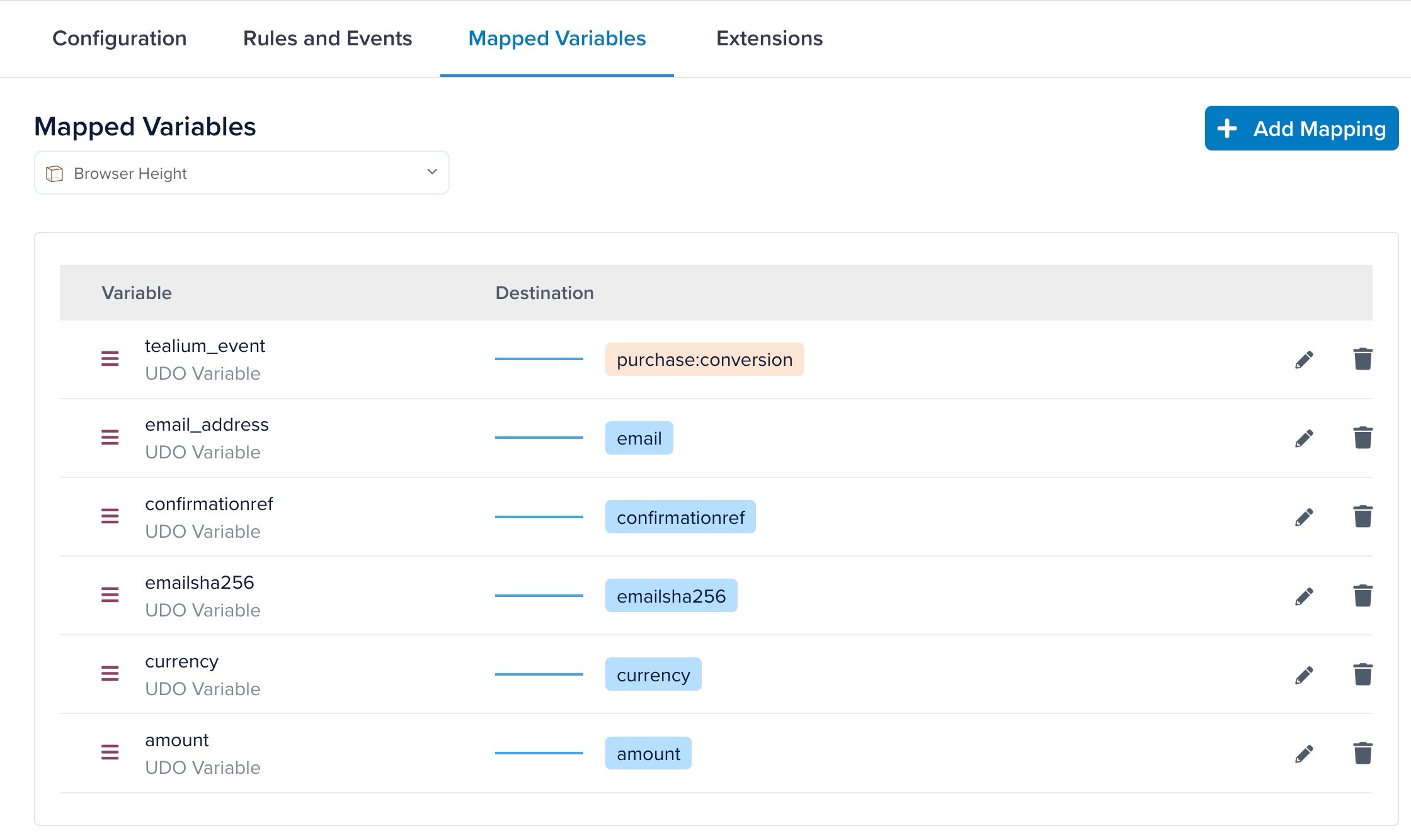
変数名のマッピング変数名のマッピング への直接リンク
Tealium変数を次のRoktフィールドにマッピングする必要があります:
emailaddressconfirmationrefamountcurrency
Tealium内で変数をRoktにマッピングする前に、特定のデータレイヤーに従って変数を設定する必要があります。変数の詳細については、Tealiumデータレイヤー変数を参照してください。