Shopify SDK 実装
このドキュメントは、Shopify 上での Rokt クライアントの実装アプローチを概説しています。Rokt SDK は Shopify のカスタムピクセルアプローチを利用して関連する 1P データを収集し、Rokt ネットワーク上でのキャンペーンパフォーマンスを最適化します。
カスタムピクセル は、第三者に送信されるデータのセキュリティと制御を改善するために設計された Lax サンドボックスで読み込まれます。そのため、カスタムピクセルを使用するにはいくつかの制限があります。
しかし、現時点では、カスタムピクセルは Shopify テーマに Rokt を統合するための推奨方法です。
前提条件前提条件 への直接リンク
専任の Rokt アカウントマネージャーが、Web SDK のためにアカウントを設定するのを支援します。彼らは必要な API キーと追加のリソースを提供します。
概要概要 への直接リンク
2 つのステップを完了します:
- ピクセルを追加して SDK を初期化する — Shopify でカスタムピクセルを作成し、Rokt 初期化スクリプト(API キーを含む)を貼り付けます。
- イベントサブスクライバーを追加する — Shopify の顧客イベントにサブスクライブし、Rokt がページビュー、商品ビュー、カート追加、チェックアウトデータを受け取るようにします。
以下のイベントスニペットは、顧客の旅(閲覧 → カート → チェックアウト → 購入)に従って順序付けられています。ピクセル内で任意の順序で追加できます。
ステップ 1: ピクセルを追加して SDK を初期化するステップ 1: ピクセルを追加して SDK を初期化する への直接リンク
初期化ステップ初期化ステップ への直接リンク
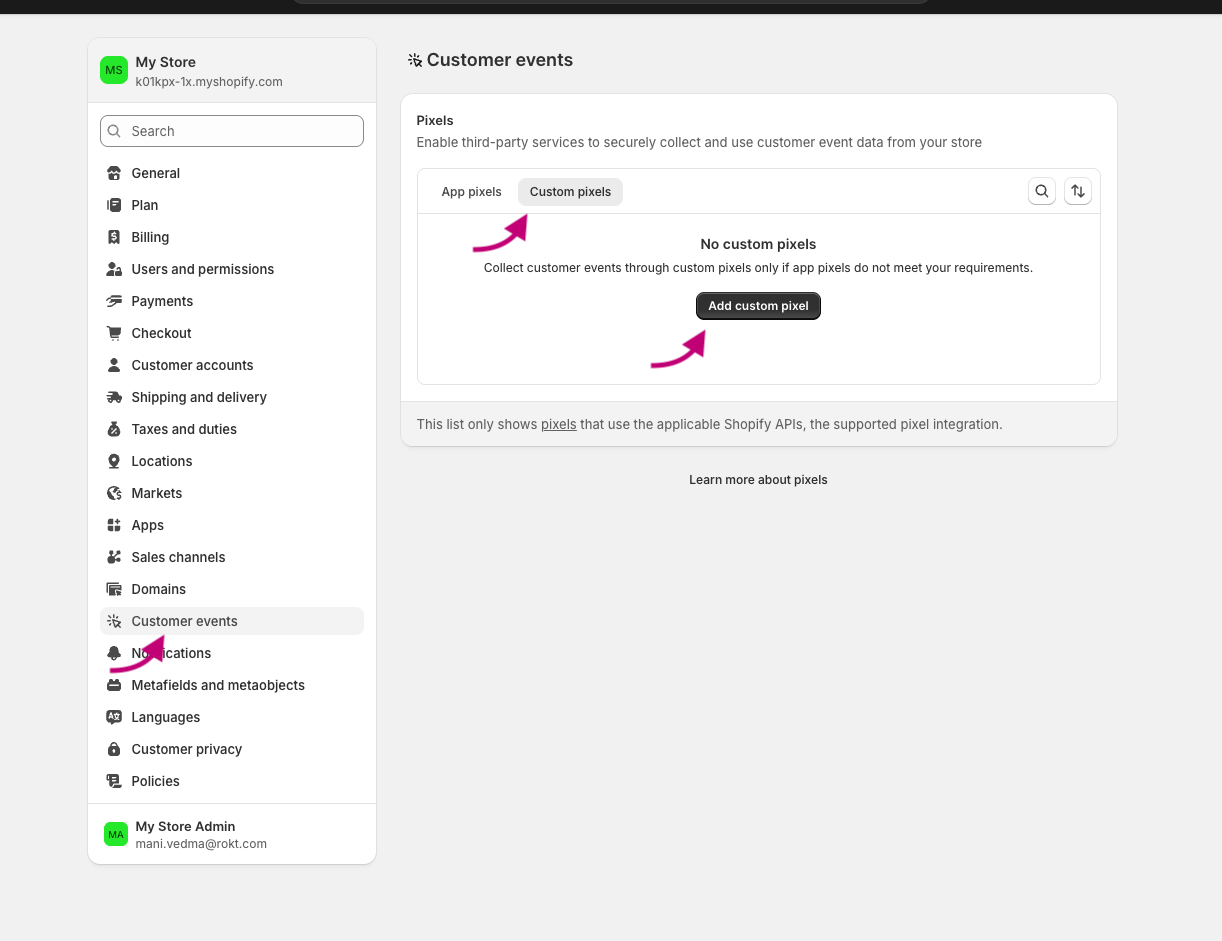
- Shopify 管理画面から、設定 > 顧客イベント に移動します。
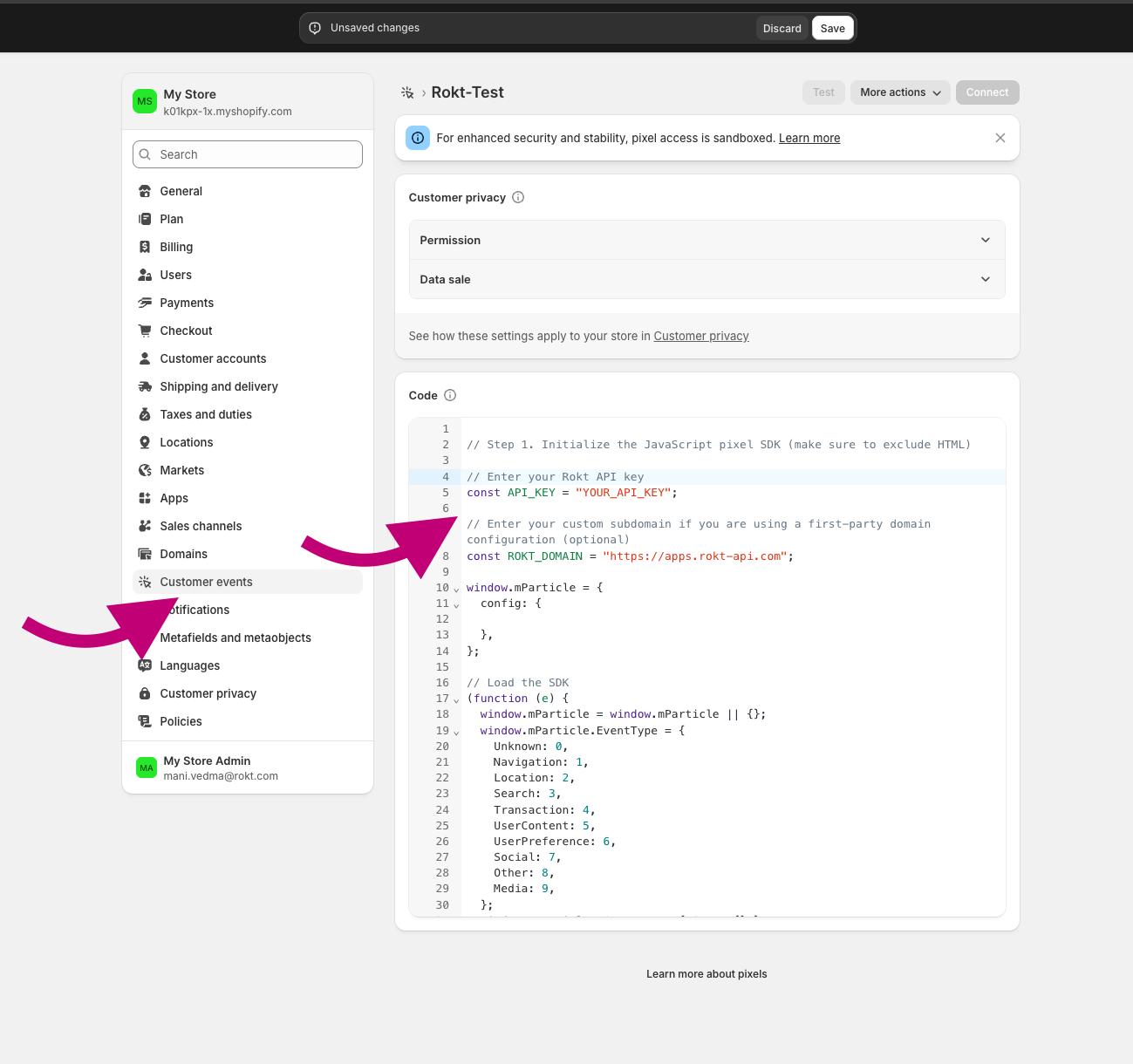
- ピクセルに一意の名前を付けます。既に存在するカスタムピクセルの名前を入力すると、別の名前を付けるように求められます。
- カスタムピクセル タブを選択します(利用可能な場合)。
- ピクセルを追加 をクリックしてイベントエディタを開きます。
// Step 1. Initialize the JavaScript pixel SDK (make sure to exclude HTML)と表示されている場所に、以下の Rokt SDK 初期化スクリプトを貼り付けます。
初期化スクリプト初期化スクリプト への直接リンク
ピクセルエディタが示す場所(例: Step 1. Initialize the JavaScript pixel SDK)に次のスクリプトを貼り付けます。YOUR_API_KEY を Rokt アカウントマネージャーから提供されたキーに置き換えてください。
// Enter your Rokt API key
const API_KEY = "YOUR_API_KEY";

// Enter your custom subdomain if you are using a first-party domain configuration (optional)
const ROKT_DOMAIN = "https://apps.rokt-api.com";

window.mParticle = {
config: {

},
};

// Load the SDK
(function(i){window.mParticle=window.mParticle||{};window.mParticle.EventType={Unknown:0,Navigation:1,Location:2,Search:3,Transaction:4,UserContent:5,UserPreference:6,Social:7,Other:8,Media:9};window.mParticle.eCommerce={Cart:{}};window.mParticle.Identity={};window.mParticle.Rokt={};window.mParticle.config=window.mParticle.config||{};window.mParticle.config.rq=[];window.mParticle.config.snippetVersion=3;window.mParticle.ready=function(e){window.mParticle.config.rq.push(e)};var e=["endSession","logError","logBaseEvent","logEvent","logForm","logLink","logPageView","setSessionAttribute","setAppName","setAppVersion","setOptOut","setPosition","startNewSession","startTrackingLocation","stopTrackingLocation"];var t=["setCurrencyCode"];var n=["identify","login","logout","modify","search"];var o=["selectPlacements","hashAttributes","hashSha256","setExtensionData","use","getVersion","terminate","onShoppableAdsReady"];e.forEach(function(e){window.mParticle[e]=r(e)});t.forEach(function(e){window.mParticle.eCommerce[e]=r(e,"eCommerce")});n.forEach(function(e){window.mParticle.Identity[e]=r(e,"Identity")});o.forEach(function(e){window.mParticle.Rokt[e]=r(e,"Rokt")});function r(t,n){return function(){if(n){t=n+"."+t}var e=Array.prototype.slice.call(arguments);e.unshift(t);window.mParticle.config.rq.push(e)}}var a=window.mParticle.config,c=a.isDevelopmentMode?1:0,s="?env="+c,w=a.dataPlan;if(w){var l=w.planId,m=w.planVersion;if(l){if(m&&(m<1||m>1e3)){m=null}s+="&plan_id="+l+(m?"&plan_version="+m:"")}}var d=a.versions;var p=[];if(d){Object.keys(d).forEach(function(e){p.push(e+"="+d[e])})}var f=document.createElement("script");f.type="text/javascript";f.async=true;window.ROKT_DOMAIN=ROKT_DOMAIN||"https://apps.rokt-api.com";window.mParticle.config.domain=window.ROKT_DOMAIN.split("//")[1];f.src=window.ROKT_DOMAIN+"/js/v3/"+i+"/app.js"+s+"&"+p.join("&");f.onerror=function(){var e=["https://apps.","rokt","ecommerce",".com"].join("");window.ROKT_DOMAIN=e;window.mParticle.config.domain=e.split("//")[1];var t=document.createElement("script");t.type="text/javascript";t.async=true;t.src=e+"/js/v3/"+i+"/app.js"+s+"&"+p.join("&");var n=document.getElementsByTagName("script")[0];n.parentNode.insertBefore(t,n)};var u=document.getElementsByTagName("script")[0];u.parentNode.insertBefore(f,u)})(API_KEY);
ステップ 2: イベントサブスクライバーを追加するステップ 2: イベントサブスクライバーを追加する への直接リンク
次のサブスクライバーをカスタムピクセルに追加します。それぞれが Shopify の顧客イベントに対応し、関連データを Rokt に送信します。
ページビューページビュー への直接リンク
analytics.subscribe("page_viewed", async (event) => {
  window.mParticle.logPageView("Page View", {
    page: event.context.document.location.href,
    title: event.context.document.title,
    referrer: event.context.document.referrer,
  });
});
商品が閲覧された商品が閲覧された への直接リンク
analytics.subscribe("product_viewed", (event) => {
  window.mParticle.ready(function () {
    var product = window.mParticle.eCommerce.createProduct(
      // Name
      event.data.productVariant.title,
      // SKU
      event.data.productVariant.sku,
      // Price
      event.data.productVariant.price.amount,
      // Quantity
      1,
      // Variant
      undefined,
      // Category
      event.data.productVariant.product.type,
      // Brand
      event.data.productVariant.product.vendor
    );
    window.mParticle.eCommerce.logProductAction(
      window.mParticle.ProductActionType.ViewDetail,
      product
    );
  });
});
カートに追加カートに追加 への直接リンク
analytics.subscribe("product_added_to_cart", (event) => {
  window.mParticle.ready(function () {
    var product = window.mParticle.eCommerce.createProduct(
      // Name
      event.data.cartLine.merchandise.product.title,
      // SKU
      event.data.cartLine.merchandise.sku,
      // Price
      event.data.cartLine.merchandise.price.amount,
      // Quantity
      event.data.cartLine.quantity,
      // Variant
      event.data.cartLine.merchandise.title,
      // Category
      event.data.cartLine.merchandise.type,
      // Brand
      event.data.cartLine.merchandise.vendor
    );
    window.mParticle.eCommerce.logProductAction(
      window.mParticle.ProductActionType.AddToCart,
      product
    );
  });
});
チェックアウト開始チェックアウト開始 への直接リンク
analytics.subscribe("checkout_started", (event) => {
  window.mParticle.ready(function () {
    const checkout = event.data.checkout;

    // Logs the Checkout product action. Defined as a function so it can run
    // inside the identify callback (identity first) or directly when there is
    // no email available yet.
    const logCheckout = function () {
      var products = [];

      checkout.lineItems.forEach(function (item) {
        var mpProduct = window.mParticle.eCommerce.createProduct(
          // Name
          item.title,
          // SKU
          item.variant.sku,
          // Price
          item.finalLinePrice.amount,
          // Quantity
          item.quantity,
          // Variant
          item.variant.title,
          // Category
          item.variant.product.type,
          // Brand
          item.variant.product.vendor
        );
        products.push(mpProduct);
      });

      var checkoutTotalPrice = checkout.totalPrice.amount;
      // Revenue must be set via transactionAttributes so it maps to total_amount.
      // createTransactionAttributes requires an id; use the checkout token, which is
      // present at checkout start (order.id is only populated on checkout_completed).
      var transactionAttributes = window.mParticle.eCommerce.createTransactionAttributes(
        // Transaction ID (required)
        checkout.token,
        // Affiliation
        undefined,
        // Coupon code
        undefined,
        // Revenue
        checkoutTotalPrice
      );
      window.mParticle.eCommerce.logProductAction(
        window.mParticle.ProductActionType.Checkout,
        products,
        { step: 2 },
        null,
        transactionAttributes
      );
    };

    // Identity first: when an email is available, identify and log the checkout
    // event inside the callback so identity is sent before it. At checkout start
    // the email is often not yet known, in which case log the event directly.
    if (checkout.email) {
      window.mParticle.Identity.identify(
        { userIdentities: { email: checkout.email } },
        function () {
          logCheckout();
        }
      );
    } else {
      logCheckout();
    }
  });
});
チェックアウトの連絡先情報が送信されたチェックアウトの連絡先情報が送信された への直接リンク
analytics.subscribe("checkout_contact_info_submitted", (event) => {
  window.mParticle.ready(function () {
    const rawemail = event.data.checkout.email;
    const identifyRequest = {
      userIdentities: {
        // If your privacy policy requires hashing, please change the key below from email to other
        email: rawemail,
        // other: hashedemail
      },
    };
    const identityCallback = function (result) {
      if (result.getUser()) {
        // Add/Remove the following user attributes per your privacy policy
        const checkout = event.data.checkout;
        const billingAddress = checkout.billingAddress;
        if (billingAddress) {
          result.getUser().setUserAttribute("$firstname", billingAddress.firstName);
          result.getUser().setUserAttribute("$lastname", billingAddress.lastName);
          result.getUser().setUserAttribute("$Mobile", billingAddress.phone);
          result.getUser().setUserAttribute("$zip", billingAddress.zip);
        }
      }
    };
    window.mParticle.Identity.identify(identifyRequest, identityCallback);
    window.mParticle.logEvent(
      "checkout_contact_info_submitted",
      window.mParticle.EventType.Transaction,
      {}
    );
  });
});
チェックアウトが完了しましたチェックアウトが完了しました への直接リンク
analytics.subscribe("checkout_completed", (event) => {
  window.mParticle.ready(function () {
    const checkout = event.data.checkout;

    // Run everything inside the identify callback so identity is always
    // established (and sent) before the purchase event fires. The purchase is
    // NOT gated on getUser(), so a null or failed identify can't block it.
    const identifyRequest = {
      userIdentities: {
        email: checkout.email,
      },
    };
    window.mParticle.Identity.identify(identifyRequest, function (result) {
      const user = result.getUser();
      if (user) {
        const billingAddress = checkout.billingAddress;
        if (billingAddress) {
          user.setUserAttribute("$firstname", billingAddress.firstName);
          user.setUserAttribute("$lastname", billingAddress.lastName);
          user.setUserAttribute("$Mobile", billingAddress.phone);
          user.setUserAttribute("$zip", billingAddress.zip);
        }
      }

      var products = [];
      checkout.lineItems.forEach(function (item) {
        var mpProduct = window.mParticle.eCommerce.createProduct(
          item.title,
          item.variant.product.id,
          item.finalLinePrice.amount,
          item.quantity,
          item.variant.title,
          item.variant.product.type,
          item.variant.product.vendor
        );
        products.push(mpProduct);
      });

      var checkoutTotalPrice = checkout.totalPrice.amount;
      // A Purchase requires a transaction id, otherwise mParticle drops the event.
      // Revenue must be set via transactionAttributes so it maps to total_amount.
      // Use the order id (populated on checkout_completed), falling back to the
      // checkout token as a stable identifier.
      var transactionAttributes = window.mParticle.eCommerce.createTransactionAttributes(
        // Transaction ID (required)
        checkout.order.id || checkout.token,
        // Affiliation
        undefined,
        // Coupon code
        undefined,
        // Revenue
        checkoutTotalPrice
      );
      window.mParticle.eCommerce.logProductAction(
        window.mParticle.ProductActionType.Purchase,
        products,
        { step: 3 },
        null,
        transactionAttributes
      );

      // Force an immediate upload. checkout_completed fires on the Thank-you page,
      // where Shopify can tear down the pixel sandbox before the SDK's batching
      // interval uploads the event. Without this flush the purchase is dropped.
      window.mParticle.upload();
    });
  });
});