Intégration Tealium pour les annonceurs
Cette page explique comment implémenter Rokt Ads en utilisant Tealium pour boucler la boucle en reliant les conversions à vos campagnes. En reliant les conversions à l'engagement de vos annonces, vous pouvez permettre une attribution plus précise, une optimisation en temps réel et une mesure de campagne.
Vous apprendrez comment créer des variables dans Tealium basées sur votre couche de données, et comment créer des balises pour initialiser le SDK Rokt et enregistrer les conversions.
Comprendre la couche de donnéesLien direct vers Comprendre la couche de données
La couche de données devrait avoir été implémentée sur votre page web par vos développeurs.
Une couche de données est un objet qui contient toutes les informations que vous souhaitez partager avec Tealium. Les variables peuvent être partagées avec Tealium via la couche de données ou dans les déclarations de changement de vue ultérieures.
Consultez le guide du développeur Tealium pour des détails complets sur le fonctionnement de la couche de données.
Exemple d'une couche de données :
window.utag_data = window.utag_data || {}

utag_data['email_address'] = 'test@test.com'
utag_data['first_name'] = 'john'
utag_data['last_name'] = 'doe'
Définir le déclencheur de vueLien direct vers Définir le déclencheur de vue
Pour déclencher l'événement de conversion approprié, utilisez le code suivant dans votre application lorsqu'une conversion se produit :
utag.view({tealium_event : 'purchase', email_address : 'john.doe@example.com', amount:'20.00', currency:'USD', confirmationref:'123456789'})
L'intégration nécessite confirmationref, amount, et currency. email_address est optionnel si vous n'utilisez pas rclid pour boucler la boucle.
Initialiser le SDK RoktLien direct vers Initialiser le SDK Rokt
- Connectez-vous à votre compte Tealium.
- Cliquez sur Tags dans la navigation de gauche.
- Cliquez sur le bouton New Tag sur le côté droit, puis sélectionnez Tealium Custom Container.
- Entrez un nom de description pour votre balise, comme "Rokt SDK".
- Sous Edit Template, collez l'extrait d'initialisation du SDK fourni ci-dessous.
- Remplacez
api_keyà l'intérieur deu.datapar la clé API Rokt fournie par votre gestionnaire de compte Rokt. - Changez la valeur de
rokt_domaindansu.datapar votre propre domaine si vous configurez une intégration de domaine de première partie. - Cliquez sur Save.
Extrait d'initialisation du SDKLien direct vers Extrait d'initialisation du SDK
//~~tv:20010.20230630
//~~tc: Tealium Custom Container
//~~tc: Updated Tealium loader to 4.35 version

/*
  Tealium Custom Container Notes:
  - Add sending code between "Start Tag Sending Code" and "End Tag Sending Code".
  - Add JavaScript tag library code between "Start Tag Library Code" and "End Tag Library Code".
  - Add JavaScript code only, do not add HTML code in this file.
  - Remove any <script> and </script> tags from the code you place in this file.

  Loading external JavaScript files (Loader):
  - If you need to load an additional external JavaScript file, un-comment the singe-line JavaScript comments ("//") within the following Loader sections near the bottom of this file:
      - "Start Loader Function Call"
      - "End Loader Function Call"
      - "Start Loader Callback Function"
      - "End Loader Callback Function"
  - After un-commenting, insert the path to the external JavaScript file you want to load.
  - Finally, within the Loader callback function, insert the JavaScript code that should run after the external JavaScript file has loaded.
*/

/* Start Tag Library Code */
window.mParticle = window.mParticle || {};
window.mParticle.EventType = { Unknown: 0, Navigation: 1, Location: 2, Search: 3, Transaction: 4, UserContent: 5, UserPreference: 6, Social: 7, Other: 8, Media: 9 };
window.mParticle.eCommerce = { Cart: {} };
window.mParticle.Identity = {};
window.mParticle.Rokt = {};
window.mParticle.config = window.mParticle.config || {};
window.mParticle.config.rq = [];
window.mParticle.config.snippetVersion = 3.0;

window.mParticle.ready = function(e) { window.mParticle.config.rq.push(e); };
["endSession", "logError", "logBaseEvent", "logEvent", "logForm", "logLink", "logPageView", "setSessionAttribute", "setAppName", "setAppVersion", "setOptOut", "setPosition", "startNewSession", "startTrackingLocation", "stopTrackingLocation"].forEach(function(e) { window.mParticle[e] = function() { var t = Array.prototype.slice.call(arguments); t.unshift(e); window.mParticle.config.rq.push(t); }; });
["setCurrencyCode", "logCheckout"].forEach(function(e) { window.mParticle.eCommerce[e] = function() { var t = Array.prototype.slice.call(arguments); t.unshift("eCommerce." + e); window.mParticle.config.rq.push(t); }; });
["identify", "login", "logout", "modify"].forEach(function(e) { window.mParticle.Identity[e] = function() { var t = Array.prototype.slice.call(arguments); t.unshift("Identity." + e); window.mParticle.config.rq.push(t); }; });
["selectPlacements","hashAttributes","hashSha256","setExtensionData","use","getVersion","terminate"].forEach(function(e) { window.mParticle.Rokt[e] = function() { var t = Array.prototype.slice.call(arguments); t.unshift("Rokt." + e); window.mParticle.config.rq.push(t); }; });

/* End Tag Library Code */

//tealium universal tag - utag.sender.custom_container ut4.0.##UTVERSION##, Copyright ##UTYEAR## Tealium.com Inc. All Rights Reserved.
try {
    (function (id, loader) {
      var u = {};
      var src;
      utag.o[loader].sender[id] = u;

      // Please do not modify
      if (utag.ut === undefined) { utag.ut = {}; }
      // Start Tealium loader 4.35
      if (utag.ut.loader === undefined) { u.loader = function (o) { var b, c, l, a = document; if (o.type === "iframe") { b = a.createElement("iframe"); o.attrs = o.attrs || { "height" : "1", "width" : "1", "style" : "display:none" }; for( l in utag.loader.GV(o.attrs) ){ b.setAttribute( l, o.attrs[l] ); } b.setAttribute("src", o.src); }else if (o.type=="img"){ utag.DB("Attach img: "+o.src); b=new Image();b.src=o.src; return; }else{ b = a.createElement("script");b.language="javascript";b.type="text/javascript";b.async=1;b.charset="utf-8"; for( l in utag.loader.GV(o.attrs) ){ b[l] = o.attrs[l]; } b.src = o.src; } if(o.id){b.id=o.id}; if (typeof o.cb=="function") { if(b.addEventListener) { b.addEventListener("load",function(){o.cb()},false); }else { /* old IE support */ b.onreadystatechange=function(){if(this.readyState=='complete'||this.readyState=='loaded'){this.onreadystatechange=null;o.cb()}}; } } l = o.loc || "head"; c = a.getElementsByTagName(l)[0]; if (c) { utag.DB("Attach to "+l+": "+o.src); if (l == "script") { c.parentNode.insertBefore(b, c); } else { c.appendChild(b) } } } } else { u.loader = utag.ut.loader; }
      // End Tealium loader

      u.ev = {view: 1, link:1};

      u.initialized = false;

      u.mapFunc = function(arr, obj, item) {
      var i = arr.shift();
      obj[i] = obj[i] || {};
      if (arr.length > 0) {
        u.mapFunc(arr,obj[i], item);
      } else {
        obj[i] = item;
      }
        };

      ##UTGEN##
      u.send = function(utag_event, data_layer) {
        if (u.ev[utag_event] || u.ev.all !== undefined) {
          //##UTENABLEDEBUG##utag.DB("send:##UTID##");

          var a ,b ,c, d, e, f, i;
          a = utag_event
          b = data_layer

          u.data = {
            /* Initialize default tag parameter values here */
            /* Examples: */
            api_key : "YOUR_API_KEY",
            rokt_domain : "https://apps.rokt-api.com",
            is_development_mode: data_layer.tealium_environment == "prod" ? false : true,
            /* A value mapped to "api_key" or "rokt_domain" in TiQ will replace these default values. */
            email: '',
            conversionType: "conversion",
            confirmationref: "",
            amount: "",
            currency: "",
            price: [],
            quantity: [],
            majorcat: [],
            majorcatid: [],
            minorcat: [],
            minorcatid: [],
            productname: [],
            sku: [],
            cartItems: {},
            custom: {},
            events: [],
          };


          /* Start Tag-Scoped Extensions Code */
          /* Please Do Not Edit This Section */
          ##UTEXTEND##
          /* End Tag-Scoped Extensions Code */


          /* Start Mapping Code */
          Object.keys(utag.loader.GV(u.map)).forEach(function(mapping_key) {
            if (data_layer[mapping_key] !== undefined && data_layer[mapping_key] !== '') {
              var destinations = u.map[mapping_key].split(',');
              destinations.forEach( function(parameter) {
                if (
                  !u.data.hasOwnProperty(parameter) &&
                  (parameter.indexOf('cartItems') !== 0)
                ) {
                  u.mapFunc(['custom'].concat(parameter.split('.')), u.data, data_layer[mapping_key]);
                  return;
                }
                u.mapFunc(parameter.split('.'), u.data, data_layer[mapping_key]);
              });

            } else {
              var event_destinations = mapping_key.split(":");
              if (
                event_destinations.length === 2 &&
                String(data_layer[event_destinations[0]]) === String(event_destinations[1])
              ) {
                if (u.map[mapping_key]) {
                  u.data.events = u.data.events.concat(u.map[mapping_key].split(","));
                }
              }
            }
          });

        //   u.initECommerceFields(data_layer);

          var attributes = {
            conversionType: u.data.conversionType,
            email: u.data.email,
            firstname: u.data.firstname,
            lastname: u.data.lastname,
            mobile: u.data.mobile,
            confirmationref: u.data.confirmationref,
            amount: u.data.amount,
            currency: u.data.currency,
            paymenttype: u.data.paymenttype,
            zipcode: u.data.zipcode,
            country: u.data.country,
            language: u.data.language,
            ccbin: u.data.ccbin,
            cartItems: []
          }

          utag.DB('send:##UTID##:MAPPINGS');
          utag.DB(u.data);
          /* End Mapping Code */

          if (!u.data.api_key) {
            utag.DB(u.id + ': Tag not fired: Required attribute api_key not populated');
            return;
          }

          /* Start Tag Sending Code */


        var t = u.data.is_development_mode ? 1 : 0, n = "?env=" + t, a = window.mParticle.config.dataPlan;
        if (a) { var o = a.planId, r = a.planVersion; o && (r && (r < 1 || r > 1e3) && (r = null), n += "&plan_id=" + o + (r ? "&plan_version=" + r : "")); }
        var i = window.mParticle.config.versions, s = [];
        i && Object.keys(i).forEach(function(e) { s.push(e + "=" + i[e]); });
        src = u.data.rokt_domain + "/js/v3/" + u.data.api_key + "/app.js" + n + "&" + s.join("&");
          /* End Tag Sending Code */


          /* Start Loader Callback Function */
          /* Un-comment the single-line JavaScript comments ("//") to use this Loader callback function. */

          u.loader_cb = function () {

            /* Start Loader Callback Tag Sending Code */
            u.data.events.forEach(function(event) {
                if (event == "conversion"){
                    window.mParticle.ready(
                        function() {

                            if (attributes.email !== null || attributes.emailsha256 !== null){
                                var userIdentities = {}
                                attributes.email && (userIdentities.email = attributes.email)
                                attributes.emailsha256 && (userIdentities.other = attributes.emailsha256)
                                var identifyRequest = {
                                    userIdentities: userIdentities
                                };
                                mParticle.Identity.identify(identifyRequest);
                            }

                            var currentUser = mParticle.Identity.getCurrentUser();

                            var transactionObject = {}
                            attributes.conversionType && (transactionObject.conversiontype = attributes.conversionType)
                            attributes.confirmationref && (transactionObject.confirmationref = attributes.confirmationref)
                            attributes.amount && (transactionObject.amount = attributes.amount)
                            attributes.currency && (transactionObject.currency = attributes.currency)

                            mParticle.logEvent(
                              "conversion", // The name of the event
                              mParticle.EventType.Transaction, // The event type
                              transactionObject

                            );
                        }
                      );
                }

            });

            /* End Loader Callback Tag Sending Code */
          };

          /* End Loader Callback Function */


          /* Start Loader Function Call */
          /* Un-comment the single-line JavaScript comments ("//") to use Loader. */

          if (!u.initialized) {
            u.loader({
              "type" : "script",
              "src" : src,
              "cb" : u.loader_cb,
              "loc" : "script",
              "id" : 'utag_##UTID##'
            });
            u.initialized = true;
          } else {
            u.loader_cb();
          }

          /* End Loader Function Call */


          //##UTENABLEDEBUG##utag.DB("send:##UTID##:COMPLETE");
        }
      };
      utag.o[loader].loader.LOAD(id);
    })("##UTID##", "##UTLOADERID##");
  } catch (error) {
    utag.DB(error);
  }
  //end tealium universal tag
Activation du scriptLien direct vers Activation du script
Sous Rules and Events, configurez votre nouvelle balise pour qu'elle se déclenche sur toutes les pages.
Sous Mapped Variables, configurez les mappages de variables UDO pour l'événement de conversion et les variables de la couche de données.
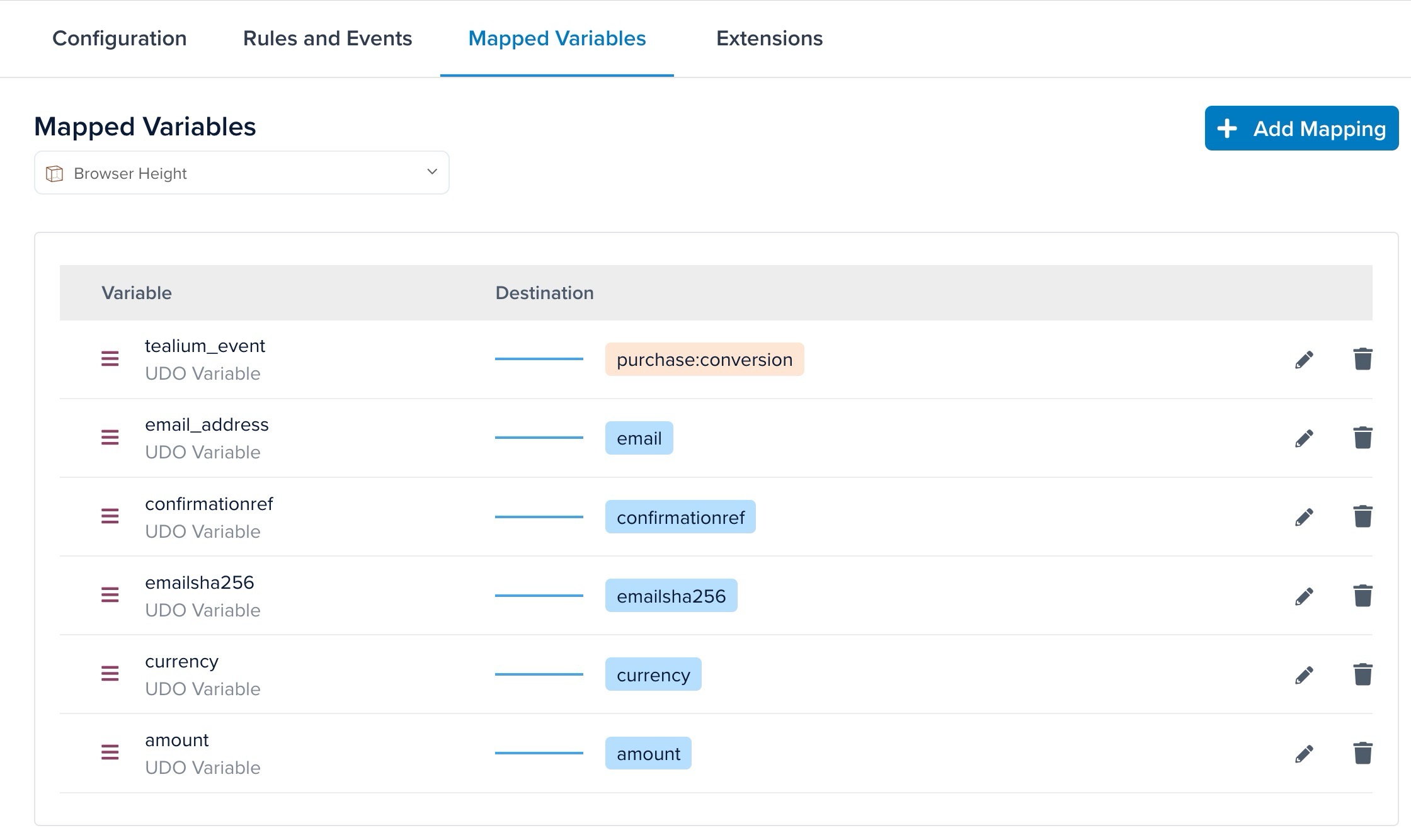
Mapper vos noms de variablesLien direct vers Mapper vos noms de variables
Vous devez mapper vos variables Tealium aux champs Rokt suivants :
emailaddressconfirmationrefamountcurrency
Vous devez configurer les variables dans Tealium selon votre couche de données spécifique avant de les mapper à Rokt. Consultez les Variables de la couche de données Tealium pour plus de détails sur les variables.