Implémentation du SDK Shopify
Ce document décrit l'approche d'implémentation pour le client Rokt sur Shopify. Le SDK Rokt utilise l'approche des pixels personnalisés de Shopify pour collecter les données 1P pertinentes, optimisant ainsi la performance des campagnes sur le réseau Rokt.
Les pixels personnalisés sont chargés dans un bac à sable Lax, conçu pour améliorer la sécurité et le contrôle des données envoyées à des tiers. Ainsi, il existe certaines limitations à l'utilisation d'un Pixel Personnalisé.
Cependant, à ce jour, un Pixel Personnalisé est la méthode recommandée pour intégrer Rokt dans votre Thème Shopify.
PrérequisLien direct vers Prérequis
Votre gestionnaire de compte Rokt dédié vous aidera à configurer votre compte pour le SDK Web. Il vous fournira la clé API requise et toutes les ressources supplémentaires nécessaires.
Vue d'ensembleLien direct vers Vue d'ensemble
Vous allez compléter deux étapes :
- Ajouter le pixel et initialiser le SDK — Créez un Pixel Personnalisé dans Shopify et collez le script d'initialisation Rokt (avec votre clé API).
- Ajouter des abonnés d'événements — Abonnez-vous aux événements clients de Shopify pour que Rokt reçoive les vues de page, les vues de produit, les ajouts au panier et les données de paiement.
Les extraits d'événements ci-dessous sont ordonnés pour suivre le parcours client (navigation → panier → paiement → achat). Vous pouvez les ajouter dans n'importe quel ordre dans votre pixel.
Étape 1 : Ajouter le pixel et initialiser le SDKLien direct vers Étape 1 : Ajouter le pixel et initialiser le SDK
Étapes d'initialisationLien direct vers Étapes d'initialisation
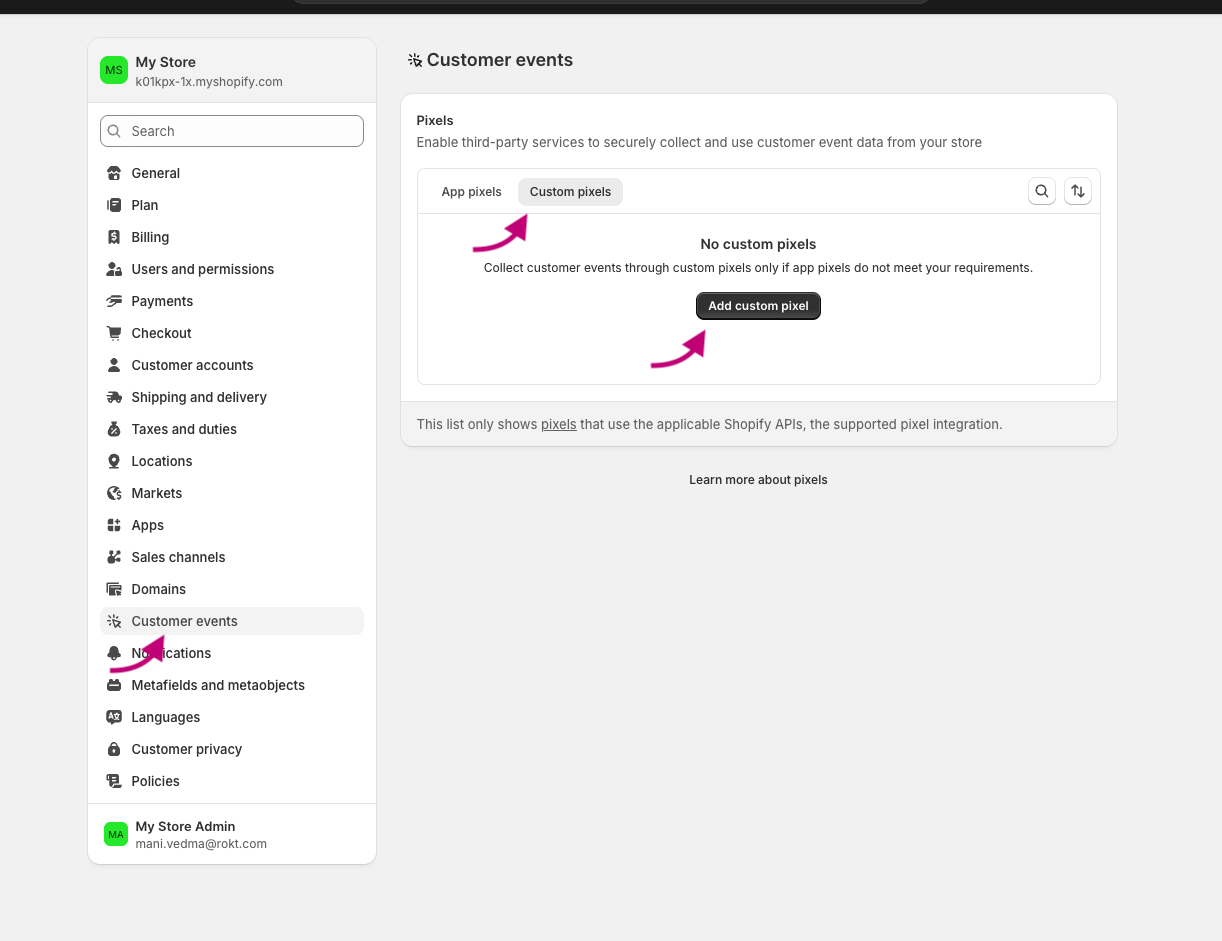
- Depuis votre administration Shopify, allez dans Paramètres > Événements clients.
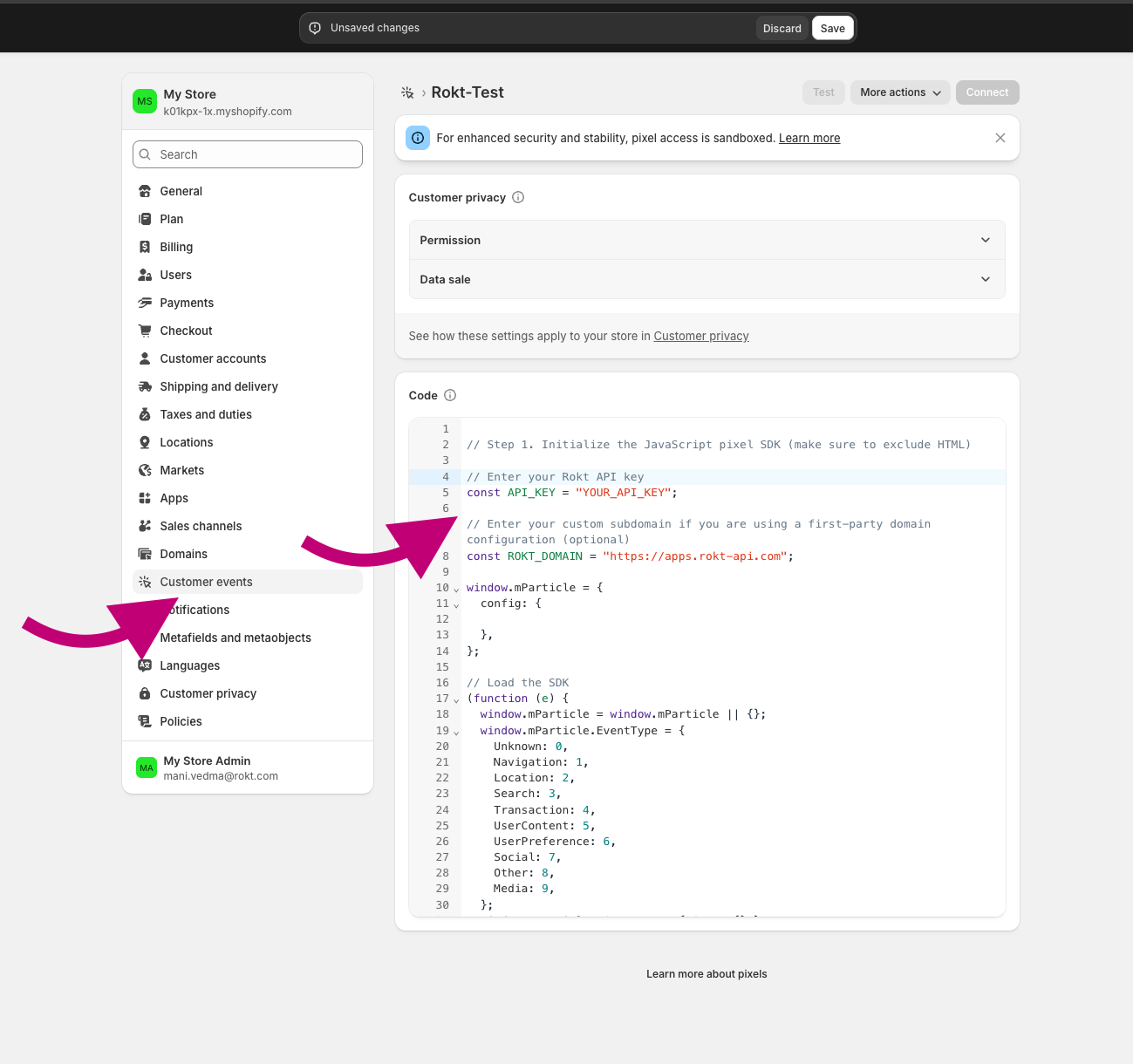
- Donnez à votre pixel un nom unique. Si vous entrez le nom d'un Pixel Personnalisé qui existe déjà, vous serez invité à donner un nom différent à votre pixel.
- Sélectionnez l'onglet Pixels Personnalisés s'il est disponible.
- Cliquez sur Ajouter un pixel pour ouvrir l'éditeur d'événements.
- Là où vous voyez
// Step 1. Initialize the JavaScript pixel SDK (make sure to exclude HTML), collez le script d'initialisation du SDK Rokt ci-dessous.
Script d'initialisationLien direct vers Script d'initialisation
Collez le script suivant là où l'éditeur de pixel l'indique (par exemple, Étape 1. Initialiser le SDK pixel JavaScript). Remplacez YOUR_API_KEY par la clé fournie par votre gestionnaire de compte Rokt.
// Enter your Rokt API key
const API_KEY = "YOUR_API_KEY";

// Enter your custom subdomain if you are using a first-party domain configuration (optional)
const ROKT_DOMAIN = "https://apps.rokt-api.com";

window.mParticle = {
config: {

},
};

// Load the SDK
(function(i){window.mParticle=window.mParticle||{};window.mParticle.EventType={Unknown:0,Navigation:1,Location:2,Search:3,Transaction:4,UserContent:5,UserPreference:6,Social:7,Other:8,Media:9};window.mParticle.eCommerce={Cart:{}};window.mParticle.Identity={};window.mParticle.Rokt={};window.mParticle.config=window.mParticle.config||{};window.mParticle.config.rq=[];window.mParticle.config.snippetVersion=3;window.mParticle.ready=function(e){window.mParticle.config.rq.push(e)};var e=["endSession","logError","logBaseEvent","logEvent","logForm","logLink","logPageView","setSessionAttribute","setAppName","setAppVersion","setOptOut","setPosition","startNewSession","startTrackingLocation","stopTrackingLocation"];var t=["setCurrencyCode"];var n=["identify","login","logout","modify","search"];var o=["selectPlacements","hashAttributes","hashSha256","setExtensionData","use","getVersion","terminate","onShoppableAdsReady"];e.forEach(function(e){window.mParticle[e]=r(e)});t.forEach(function(e){window.mParticle.eCommerce[e]=r(e,"eCommerce")});n.forEach(function(e){window.mParticle.Identity[e]=r(e,"Identity")});o.forEach(function(e){window.mParticle.Rokt[e]=r(e,"Rokt")});function r(t,n){return function(){if(n){t=n+"."+t}var e=Array.prototype.slice.call(arguments);e.unshift(t);window.mParticle.config.rq.push(e)}}var a=window.mParticle.config,c=a.isDevelopmentMode?1:0,s="?env="+c,w=a.dataPlan;if(w){var l=w.planId,m=w.planVersion;if(l){if(m&&(m<1||m>1e3)){m=null}s+="&plan_id="+l+(m?"&plan_version="+m:"")}}var d=a.versions;var p=[];if(d){Object.keys(d).forEach(function(e){p.push(e+"="+d[e])})}var f=document.createElement("script");f.type="text/javascript";f.async=true;window.ROKT_DOMAIN=ROKT_DOMAIN||"https://apps.rokt-api.com";window.mParticle.config.domain=window.ROKT_DOMAIN.split("//")[1];f.src=window.ROKT_DOMAIN+"/js/v3/"+i+"/app.js"+s+"&"+p.join("&");f.onerror=function(){var e=["https://apps.","rokt","ecommerce",".com"].join("");window.ROKT_DOMAIN=e;window.mParticle.config.domain=e.split("//")[1];var t=document.createElement("script");t.type="text/javascript";t.async=true;t.src=e+"/js/v3/"+i+"/app.js"+s+"&"+p.join("&");var n=document.getElementsByTagName("script")[0];n.parentNode.insertBefore(t,n)};var u=document.getElementsByTagName("script")[0];u.parentNode.insertBefore(f,u)})(API_KEY);
Étape 2 : Ajouter des abonnés d'événementsLien direct vers Étape 2 : Ajouter des abonnés d'événements
Ajoutez les abonnés suivants dans votre Pixel Personnalisé. Chacun correspond à un événement client Shopify et envoie les données pertinentes à Rokt.
Vues de pageLien direct vers Vues de page
analytics.subscribe("page_viewed", async (event) => {
  window.mParticle.logPageView("Page View", {
    page: event.context.document.location.href,
    title: event.context.document.title,
    referrer: event.context.document.referrer,
  });
});
Produit vuLien direct vers Produit vu
analytics.subscribe("product_viewed", (event) => {
  window.mParticle.ready(function () {
    var product = window.mParticle.eCommerce.createProduct(
      // Name
      event.data.productVariant.title,
      // SKU
      event.data.productVariant.sku,
      // Price
      event.data.productVariant.price.amount,
      // Quantity
      1,
      // Variant
      undefined,
      // Category
      event.data.productVariant.product.type,
      // Brand
      event.data.productVariant.product.vendor
    );
    window.mParticle.eCommerce.logProductAction(
      window.mParticle.ProductActionType.ViewDetail,
      product
    );
  });
});
Ajout au panierLien direct vers Ajout au panier
analytics.subscribe("product_added_to_cart", (event) => {
  window.mParticle.ready(function () {
    var product = window.mParticle.eCommerce.createProduct(
      // Name
      event.data.cartLine.merchandise.product.title,
      // SKU
      event.data.cartLine.merchandise.sku,
      // Price
      event.data.cartLine.merchandise.price.amount,
      // Quantity
      event.data.cartLine.quantity,
      // Variant
      event.data.cartLine.merchandise.title,
      // Category
      event.data.cartLine.merchandise.type,
      // Brand
      event.data.cartLine.merchandise.vendor
    );
    window.mParticle.eCommerce.logProductAction(
      window.mParticle.ProductActionType.AddToCart,
      product
    );
  });
});
Début du paiementLien direct vers Début du paiement
analytics.subscribe("checkout_started", (event) => {
  window.mParticle.ready(function () {
    const checkout = event.data.checkout;

    // Logs the Checkout product action. Defined as a function so it can run
    // inside the identify callback (identity first) or directly when there is
    // no email available yet.
    const logCheckout = function () {
      var products = [];

      checkout.lineItems.forEach(function (item) {
        var mpProduct = window.mParticle.eCommerce.createProduct(
          // Name
          item.title,
          // SKU
          item.variant.sku,
          // Price
          item.finalLinePrice.amount,
          // Quantity
          item.quantity,
          // Variant
          item.variant.title,
          // Category
          item.variant.product.type,
          // Brand
          item.variant.product.vendor
        );
        products.push(mpProduct);
      });

      var checkoutTotalPrice = checkout.totalPrice.amount;
      // Revenue must be set via transactionAttributes so it maps to total_amount.
      // createTransactionAttributes requires an id; use the checkout token, which is
      // present at checkout start (order.id is only populated on checkout_completed).
      var transactionAttributes = window.mParticle.eCommerce.createTransactionAttributes(
        // Transaction ID (required)
        checkout.token,
        // Affiliation
        undefined,
        // Coupon code
        undefined,
        // Revenue
        checkoutTotalPrice
      );
      window.mParticle.eCommerce.logProductAction(
        window.mParticle.ProductActionType.Checkout,
        products,
        { step: 2 },
        null,
        transactionAttributes
      );
    };

    // Identity first: when an email is available, identify and log the checkout
    // event inside the callback so identity is sent before it. At checkout start
    // the email is often not yet known, in which case log the event directly.
    if (checkout.email) {
      window.mParticle.Identity.identify(
        { userIdentities: { email: checkout.email } },
        function () {
          logCheckout();
        }
      );
    } else {
      logCheckout();
    }
  });
});
Informations de contact du paiement soumisesLien direct vers Informations de contact du paiement soumises
analytics.subscribe("checkout_contact_info_submitted", (event) => {
  window.mParticle.ready(function () {
    const rawemail = event.data.checkout.email;
    const identifyRequest = {
      userIdentities: {
        // If your privacy policy requires hashing, please change the key below from email to other
        email: rawemail,
        // other: hashedemail
      },
    };
    const identityCallback = function (result) {
      if (result.getUser()) {
        // Add/Remove the following user attributes per your privacy policy
        const checkout = event.data.checkout;
        const billingAddress = checkout.billingAddress;
        if (billingAddress) {
          result.getUser().setUserAttribute("$firstname", billingAddress.firstName);
          result.getUser().setUserAttribute("$lastname", billingAddress.lastName);
          result.getUser().setUserAttribute("$Mobile", billingAddress.phone);
          result.getUser().setUserAttribute("$zip", billingAddress.zip);
        }
      }
    };
    window.mParticle.Identity.identify(identifyRequest, identityCallback);
    window.mParticle.logEvent(
      "checkout_contact_info_submitted",
      window.mParticle.EventType.Transaction,
      {}
    );
  });
});
Paiement terminéLien direct vers Paiement terminé
analytics.subscribe("checkout_completed", (event) => {
  window.mParticle.ready(function () {
    const checkout = event.data.checkout;

    // Run everything inside the identify callback so identity is always
    // established (and sent) before the purchase event fires. The purchase is
    // NOT gated on getUser(), so a null or failed identify can't block it.
    const identifyRequest = {
      userIdentities: {
        email: checkout.email,
      },
    };
    window.mParticle.Identity.identify(identifyRequest, function (result) {
      const user = result.getUser();
      if (user) {
        const billingAddress = checkout.billingAddress;
        if (billingAddress) {
          user.setUserAttribute("$firstname", billingAddress.firstName);
          user.setUserAttribute("$lastname", billingAddress.lastName);
          user.setUserAttribute("$Mobile", billingAddress.phone);
          user.setUserAttribute("$zip", billingAddress.zip);
        }
      }

      var products = [];
      checkout.lineItems.forEach(function (item) {
        var mpProduct = window.mParticle.eCommerce.createProduct(
          item.title,
          item.variant.product.id,
          item.finalLinePrice.amount,
          item.quantity,
          item.variant.title,
          item.variant.product.type,
          item.variant.product.vendor
        );
        products.push(mpProduct);
      });

      var checkoutTotalPrice = checkout.totalPrice.amount;
      // A Purchase requires a transaction id, otherwise mParticle drops the event.
      // Revenue must be set via transactionAttributes so it maps to total_amount.
      // Use the order id (populated on checkout_completed), falling back to the
      // checkout token as a stable identifier.
      var transactionAttributes = window.mParticle.eCommerce.createTransactionAttributes(
        // Transaction ID (required)
        checkout.order.id || checkout.token,
        // Affiliation
        undefined,
        // Coupon code
        undefined,
        // Revenue
        checkoutTotalPrice
      );
      window.mParticle.eCommerce.logProductAction(
        window.mParticle.ProductActionType.Purchase,
        products,
        { step: 3 },
        null,
        transactionAttributes
      );

      // Force an immediate upload. checkout_completed fires on the Thank-you page,
      // where Shopify can tear down the pixel sandbox before the SDK's batching
      // interval uploads the event. Without this flush the purchase is dropped.
      window.mParticle.upload();
    });
  });
});