Rokt Click ID Overview
The Rokt Click ID can be used for conversion attribution in the event you'd like to track conversions without sharing customer data. Here's how it works:
- For each accepted offer, Rokt generates a unique Rokt Click ID that you'll use as a dynamic field in the destination URL (UTM parameter).
- Then, your attribution system maintains the Rokt Click ID.
- Finally, you return the Rokt Click ID to us when the customer converts. There are several options for returning the Rokt Click ID, which we've outlined below.
Generate the Rokt Click IDDirect link to Generate the Rokt Click ID
Please work with your account manager to complete the following steps.
To generate the unique Rokt Click ID, please ensure that the destination URL of your creative includes the following as a URL parameter: rtid={rokt.rclid|}.
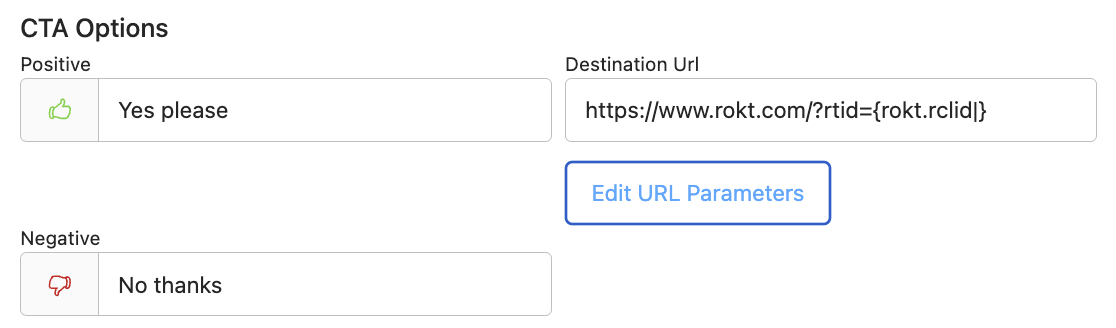
In the Destination URL, you will need to add & or ? before rtid={rokt.rclid|}. This is determined by the original traffic link. If the original traffic link contains a ?, add an & before the rtid.
Example: www.landingpage.com/?hello=world&rtid={rokt.rclid|}
If the original traffic link does not contain a ?, add a ? before the rtid
Example: www.landingpage.com/?rtid={rokt.rclid|}
Storing and returning the Rokt Click IDDirect link to Storing and returning the Rokt Click ID
Once you've completed the above steps, a unique ID will be generated that allows conversion events to be tracked. When a customer converts, you'll return this ID back to Rokt for attribution. There are several methods to store and return this ID, which we've detailed below. Please reach out to your account manager if you have any questions.
Store and return the Rokt Click ID via the Rokt referral tagDirect link to Store and return the Rokt Click ID via the Rokt referral tag
You can use the Rokt referral tag to store the Rokt Click ID, then return it to Rokt via the Web SDK or Event API when a customer converts. Once you've added the Rokt Click ID to your traffic URL, please work with your technical team to follow the integration instructions here.
Store and return the Rokt Click ID via a custom solutionDirect link to Store and return the Rokt Click ID via a custom solution
If you have a method to store the Rokt Click ID so that you can return it to Rokt when the customer converts, you can simply integrate that storage method with either the Rokt Web SDK or Event API.
To return the Rokt Click ID, please add the Rokt Web SDK on your conversion page. There are several options to integrate the Rokt Web SDK onto your conversion page, including through Google Tag Manager, Tealium, Adobe Experience Platform or integrating the Web SDK directly.
Alternatively, you can also use the Event API to return the Rokt Click ID. For more information, please talk to your Rokt account manager.
Store and return the Rokt Click ID via a third-party measurement providerDirect link to Store and return the Rokt Click ID via a third-party measurement provider
If you'd prefer to use a third-party management provider to integrate the Rokt Click ID for conversion attribution, please see our documentation here.