Shopify SDK Implementation
This document outlines the implementation approach for the Rokt client on Shopify. The Rokt SDK utilizes the Shopify custom pixel approach to collect relevant 1P data, optimizing campaign performance on the Rokt network.
Custom pixels are loaded in a Lax sandbox, designed for improved security and control over the data that is sent to third parties. As such, there are some limitations to using a Custom Pixel.
However, at this time, a Custom Pixel is the recommended method for integrating Rokt into your Shopify Theme.
PrerequisitesPrerequisites への直接リンク
Your dedicated Rokt account manager will assist in configuring your account for the Web SDK. They will provide the required API key and any additional resources needed.
OverviewOverview への直接リンク
You will complete two steps:
- Add the pixel and initialize the SDK — Create a Custom Pixel in Shopify and paste the Rokt initialization script (with your API key).
- Add event subscribers — Subscribe to Shopify customer events so Rokt receives page views, product views, add-to-cart, and checkout data.
The event snippets below are ordered to follow the customer journey (browse → cart → checkout → purchase). You can add them in any order in your pixel.
Step 1: Add the pixel and initialize the SDKStep 1: Add the pixel and initialize the SDK への直接リンク
Initialization stepsInitialization steps への直接リンク
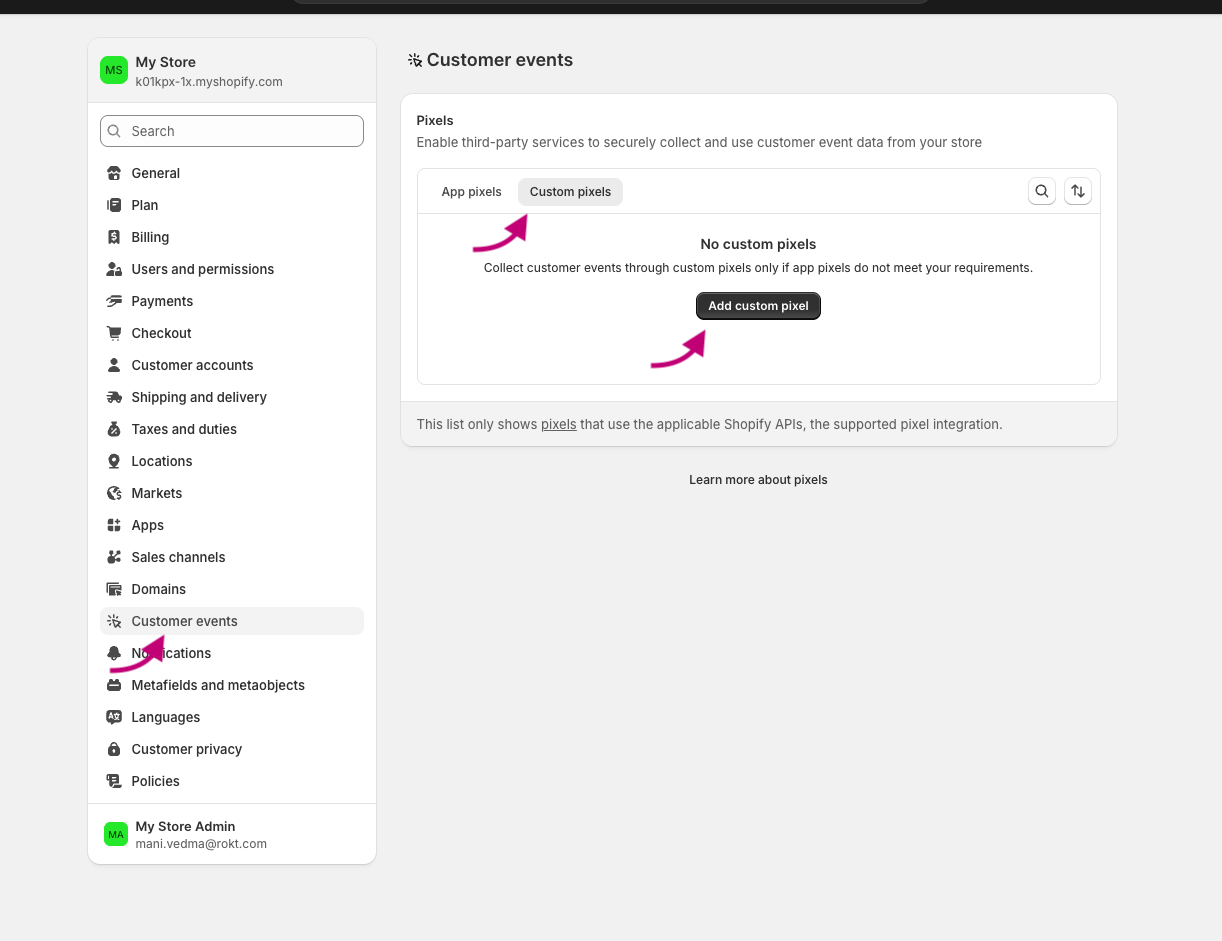
- From your Shopify admin, go to Settings > Customer events.
- Give your pixel a unique name. If you enter the name of a Custom Pixel that already exists, you'll be prompted to give your pixel a different name.
- Select the Custom Pixels tab if it is available.
- Click Add pixel to open the event editor.
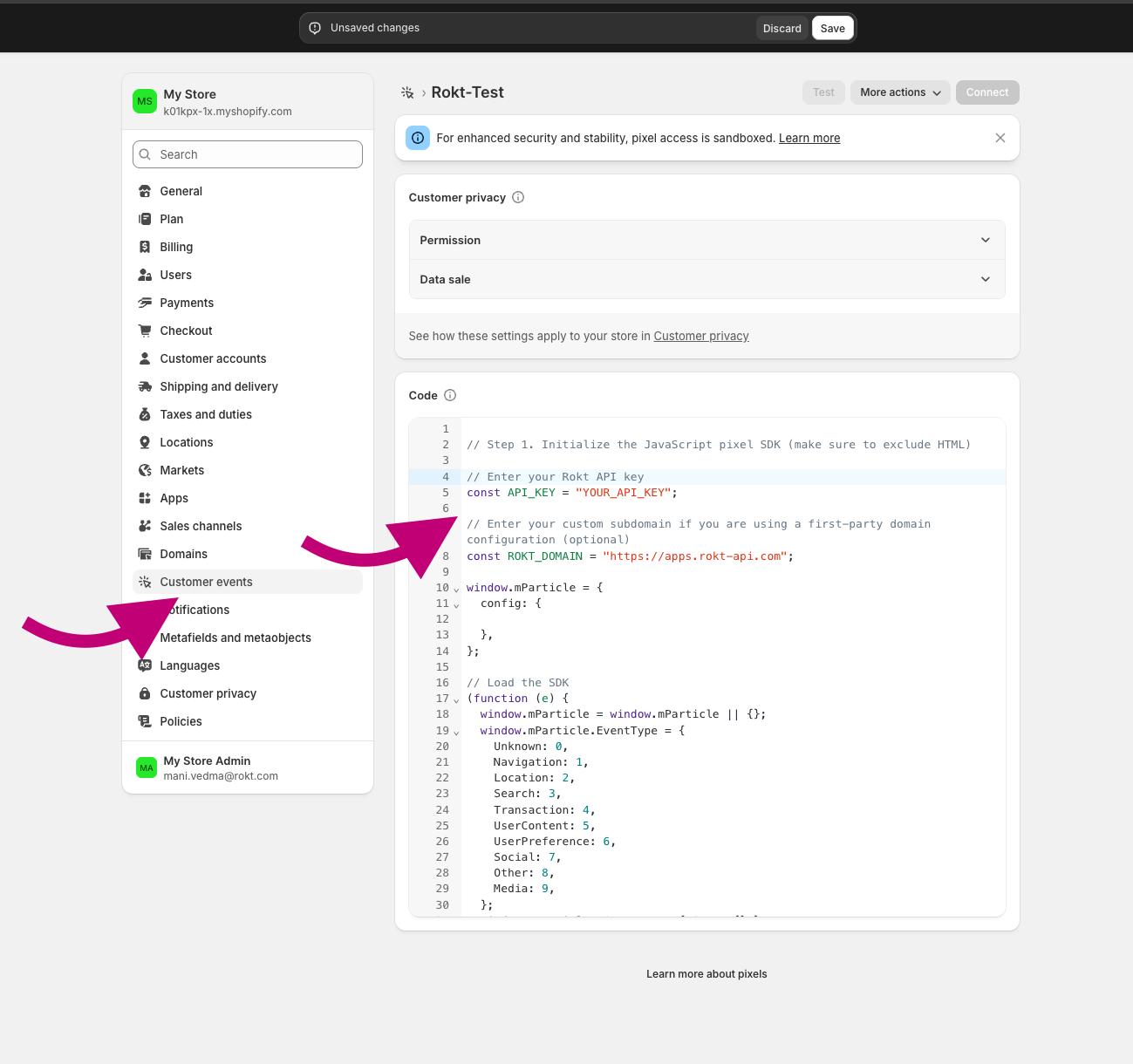
- Where you see
// Step 1. Initialize the JavaScript pixel SDK (make sure to exclude HTML), paste the Rokt SDK initialization script below.
Initialization scriptInitialization script への直接リンク
Paste the following script where the pixel editor indicates (e.g. Step 1. Initialize the JavaScript pixel SDK). Replace YOUR_API_KEY with the key provided by your Rokt account manager.
// Enter your Rokt API key
const API_KEY = "YOUR_API_KEY";

// Enter your custom subdomain if you are using a first-party domain configuration (optional)
const ROKT_DOMAIN = "https://apps.rokt-api.com";

window.mParticle = {
  config: {

  },
};

// Load the SDK
(function (e) {
  window.mParticle = window.mParticle || {};
  window.mParticle.EventType = {
    Unknown: 0,
    Navigation: 1,
    Location: 2,
    Search: 3,
    Transaction: 4,
    UserContent: 5,
    UserPreference: 6,
    Social: 7,
    Other: 8,
    Media: 9,
  };
  window.mParticle.eCommerce = { Cart: {} };
  window.mParticle.Identity = {};
  window.mParticle.Rokt = {};
  window.mParticle.config = window.mParticle.config || {};
  window.mParticle.config.rq = [];
  window.mParticle.config.snippetVersion = 2.7;
  window.mParticle.ready = function (e) {
    window.mParticle.config.rq.push(e);
  };
  [
    "endSession",
    "logError",
    "logBaseEvent",
    "logEvent",
    "logForm",
    "logLink",
    "logPageView",
    "setSessionAttribute",
    "setAppName",
    "setAppVersion",
    "setOptOut",
    "setPosition",
    "startNewSession",
    "startTrackingLocation",
    "stopTrackingLocation",
  ].forEach(function (e) {
    window.mParticle[e] = function () {
      var t = Array.prototype.slice.call(arguments);
      t.unshift(e);
      window.mParticle.config.rq.push(t);
    };
  });
  ["setCurrencyCode", "logCheckout"].forEach(function (e) {
    window.mParticle.eCommerce[e] = function () {
      var t = Array.prototype.slice.call(arguments);
      t.unshift("eCommerce." + e);
      window.mParticle.config.rq.push(t);
    };
  });
  ["identify", "login", "logout", "modify"].forEach(function (e) {
    window.mParticle.Identity[e] = function () {
      var t = Array.prototype.slice.call(arguments);
      t.unshift("Identity." + e);
      window.mParticle.config.rq.push(t);
    };
  });
  ["selectPlacements", "hashAttributes", "setExtensionData", "use", "getVersion", "terminate"].forEach(
    function (e) {
      window.mParticle.Rokt[e] = function () {
        var t = Array.prototype.slice.call(arguments);
        t.unshift("Rokt." + e);
        window.mParticle.config.rq.push(t);
      };
    }
  );
  var t = window.mParticle.config.isDevelopmentMode ? 1 : 0,
    n = "?env=" + t,
    a = window.mParticle.config.dataPlan;
  if (a) {
    var o = a.planId,
      r = a.planVersion;
    o && (r && (r < 1 || r > 1e3) && (r = null), (n += "&plan_id=" + o + (r ? "&plan_version=" + r : "")));
  }
  var i = window.mParticle.config.versions,
    s = [];
  i &&
    Object.keys(i).forEach(function (e) {
      s.push(e + "=" + i[e]);
    });
  var c = document.createElement("script");
  c.type = "text/javascript";
  c.async = !0;
  window.ROKT_DOMAIN = ROKT_DOMAIN || "https://apps.rokt-api.com";
  mParticle.config.domain = ROKT_DOMAIN.split("//")[1];
  c.src = ROKT_DOMAIN + "/js/v2/" + e + "/app.js" + n + "&" + s.join("&");
  c.onerror = function () {
    var u = ["https://apps.", "rokt", "ecommerce", ".com"].join("");
    window.ROKT_DOMAIN = u;
    mParticle.config.domain = u.split("//")[1];
    var d = document.createElement("script");
    d.type = "text/javascript";
    d.async = !0;
    d.src = u + "/js/v2/" + e + "/app.js" + n + "&" + s.join("&");
    var f = document.getElementsByTagName("script")[0];
    f.parentNode.insertBefore(d, f);
  };
  var l = document.getElementsByTagName("script")[0];
  l.parentNode.insertBefore(c, l);
})(API_KEY);
Step 2: Add event subscribersStep 2: Add event subscribers への直接リンク
Add the following subscribers in your Custom Pixel. Each corresponds to a Shopify customer event and sends the relevant data to Rokt.
Page viewsPage views への直接リンク
analytics.subscribe("page_viewed", async (event) => {
  window.mParticle.logPageView("Page View", {
    page: event.context.document.location.href,
    title: event.context.document.title,
    referrer: event.context.document.referrer,
  });
});
Product viewedProduct viewed への直接リンク
analytics.subscribe("product_viewed", (event) => {
  window.mParticle.ready(function () {
    var product = window.mParticle.eCommerce.createProduct(
      // Name
      event.data.productVariant.title,
      // SKU
      event.data.productVariant.sku,
      // Price
      event.data.productVariant.price.amount,
      // Quantity
      1,
      // Variant
      undefined,
      // Category
      event.data.productVariant.product.type,
      // Brand
      event.data.productVariant.product.vendor
    );
    window.mParticle.eCommerce.logProductAction(
      window.mParticle.ProductActionType.ViewDetail,
      product
    );
  });
});
Add to cartAdd to cart への直接リンク
analytics.subscribe("product_added_to_cart", (event) => {
  window.mParticle.ready(function () {
    var product = window.mParticle.eCommerce.createProduct(
      // Name
      event.data.cartLine.merchandise.product.title,
      // SKU
      event.data.cartLine.merchandise.sku,
      // Price
      event.data.cartLine.merchandise.price.amount,
      // Quantity
      event.data.cartLine.quantity,
      // Variant
      event.data.cartLine.merchandise.title,
      // Category
      event.data.cartLine.merchandise.type,
      // Brand
      event.data.cartLine.merchandise.vendor
    );
    window.mParticle.eCommerce.logProductAction(
      window.mParticle.ProductActionType.AddToCart,
      product
    );
  });
});
Checkout startedCheckout started への直接リンク
analytics.subscribe("checkout_started", (event) => {
  window.mParticle.ready(function () {
    const checkout = event.data.checkout;

    // Logs the Checkout product action. Defined as a function so it can run
    // inside the identify callback (identity first) or directly when there is
    // no email available yet.
    const logCheckout = function () {
      var products = [];

      checkout.lineItems.forEach(function (item) {
        var mpProduct = window.mParticle.eCommerce.createProduct(
          // Name
          item.title,
          // SKU
          item.variant.sku,
          // Price
          item.finalLinePrice.amount,
          // Quantity
          item.quantity,
          // Variant
          item.variant.title,
          // Category
          item.variant.product.type,
          // Brand
          item.variant.product.vendor
        );
        products.push(mpProduct);
      });

      var checkoutTotalPrice = checkout.totalPrice.amount;
      // Revenue must be set via transactionAttributes so it maps to total_amount.
      // createTransactionAttributes requires an id; use the checkout token, which is
      // present at checkout start (order.id is only populated on checkout_completed).
      var transactionAttributes = window.mParticle.eCommerce.createTransactionAttributes(
        // Transaction ID (required)
        checkout.token,
        // Affiliation
        undefined,
        // Coupon code
        undefined,
        // Revenue
        checkoutTotalPrice
      );
      window.mParticle.eCommerce.logProductAction(
        window.mParticle.ProductActionType.Checkout,
        products,
        { step: 2 },
        null,
        transactionAttributes
      );
    };

    // Identity first: when an email is available, identify and log the checkout
    // event inside the callback so identity is sent before it. At checkout start
    // the email is often not yet known, in which case log the event directly.
    if (checkout.email) {
      window.mParticle.Identity.identify(
        { userIdentities: { email: checkout.email } },
        function () {
          logCheckout();
        }
      );
    } else {
      logCheckout();
    }
  });
});
Checkout contact info submittedCheckout contact info submitted への直接リンク
analytics.subscribe("checkout_contact_info_submitted", (event) => {
  window.mParticle.ready(function () {
    const rawemail = event.data.checkout.email;
    const identifyRequest = {
      userIdentities: {
        // If your privacy policy requires hashing, please change the key below from email to other
        email: rawemail,
        // other: hashedemail
      },
    };
    const identityCallback = function (result) {
      if (result.getUser()) {
        // Add/Remove the following user attributes per your privacy policy
        const checkout = event.data.checkout;
        const billingAddress = checkout.billingAddress;
        if (billingAddress) {
          result.getUser().setUserAttribute("$firstname", billingAddress.firstName);
          result.getUser().setUserAttribute("$lastname", billingAddress.lastName);
          result.getUser().setUserAttribute("$Mobile", billingAddress.phone);
          result.getUser().setUserAttribute("$zip", billingAddress.zip);
        }
      }
    };
    window.mParticle.Identity.identify(identifyRequest, identityCallback);
    window.mParticle.logEvent(
      "checkout_contact_info_submitted",
      window.mParticle.EventType.Transaction,
      {}
    );
  });
});
Checkout completedCheckout completed への直接リンク
analytics.subscribe("checkout_completed", (event) => {
  window.mParticle.ready(function () {
    const checkout = event.data.checkout;

    // Run everything inside the identify callback so identity is always
    // established (and sent) before the purchase event fires. The purchase is
    // NOT gated on getUser(), so a null or failed identify can't block it.
    const identifyRequest = {
      userIdentities: {
        email: checkout.email,
      },
    };
    window.mParticle.Identity.identify(identifyRequest, function (result) {
      const user = result.getUser();
      if (user) {
        const billingAddress = checkout.billingAddress;
        if (billingAddress) {
          user.setUserAttribute("$firstname", billingAddress.firstName);
          user.setUserAttribute("$lastname", billingAddress.lastName);
          user.setUserAttribute("$Mobile", billingAddress.phone);
          user.setUserAttribute("$zip", billingAddress.zip);
        }
      }

      var products = [];
      checkout.lineItems.forEach(function (item) {
        var mpProduct = window.mParticle.eCommerce.createProduct(
          item.title,
          item.variant.product.id,
          item.finalLinePrice.amount,
          item.quantity,
          item.variant.title,
          item.variant.product.type,
          item.variant.product.vendor
        );
        products.push(mpProduct);
      });

      var checkoutTotalPrice = checkout.totalPrice.amount;
      // A Purchase requires a transaction id, otherwise mParticle drops the event.
      // Revenue must be set via transactionAttributes so it maps to total_amount.
      // Use the order id (populated on checkout_completed), falling back to the
      // checkout token as a stable identifier.
      var transactionAttributes = window.mParticle.eCommerce.createTransactionAttributes(
        // Transaction ID (required)
        checkout.order.id || checkout.token,
        // Affiliation
        undefined,
        // Coupon code
        undefined,
        // Revenue
        checkoutTotalPrice
      );
      window.mParticle.eCommerce.logProductAction(
        window.mParticle.ProductActionType.Purchase,
        products,
        { step: 3 },
        null,
        transactionAttributes
      );

      // Force an immediate upload. checkout_completed fires on the Thank-you page,
      // where Shopify can tear down the pixel sandbox before the SDK's batching
      // interval uploads the event. Without this flush the purchase is dropped.
      window.mParticle.upload();
    });
  });
});