Shopify SDK Implementation
This document outlines the implementation approach for the Rokt client on Shopify. The Rokt SDK utilizes the Shopify custom pixel approach to collect relevant 1P data, optimizing campaign performance on the Rokt network.
Custom pixels are loaded in a Lax sandbox, designed for improved security and control over the data that is sent to third parties. As such, there are some limitations to using a Custom Pixel.
However, at this time, a Custom Pixel is the recommended method for integrating Rokt into your Shopify Theme.
PrerequisitesLien direct vers Prerequisites
Your dedicated Rokt account manager will assist in configuring your account for the Web SDK. They will provide the required API key and any additional resources needed.
OverviewLien direct vers Overview
You will complete two steps:
- Add the pixel and initialize the SDK — Create a Custom Pixel in Shopify and paste the Rokt initialization script (with your API key).
- Add event subscribers — Subscribe to Shopify customer events so Rokt receives page views, product views, add-to-cart, and checkout data.
The event snippets below are ordered to follow the customer journey (browse → cart → checkout → purchase). You can add them in any order in your pixel.
Step 1: Add the pixel and initialize the SDKLien direct vers Step 1: Add the pixel and initialize the SDK
Initialization stepsLien direct vers Initialization steps
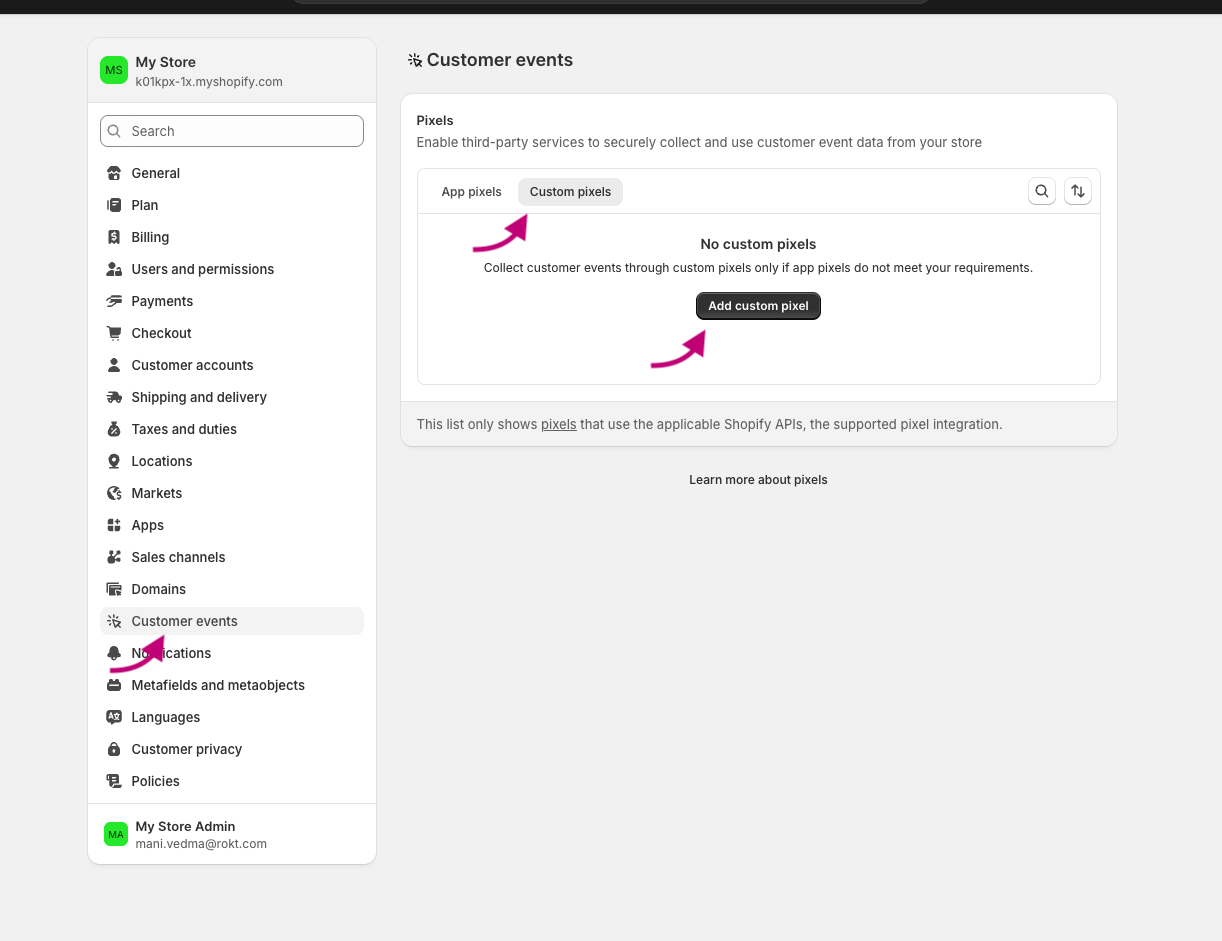
- From your Shopify admin, go to Settings > Customer events.
- Give your pixel a unique name. If you enter the name of a Custom Pixel that already exists, you'll be prompted to give your pixel a different name.
- Select the Custom Pixels tab if it is available.
- Click Add pixel to open the event editor.
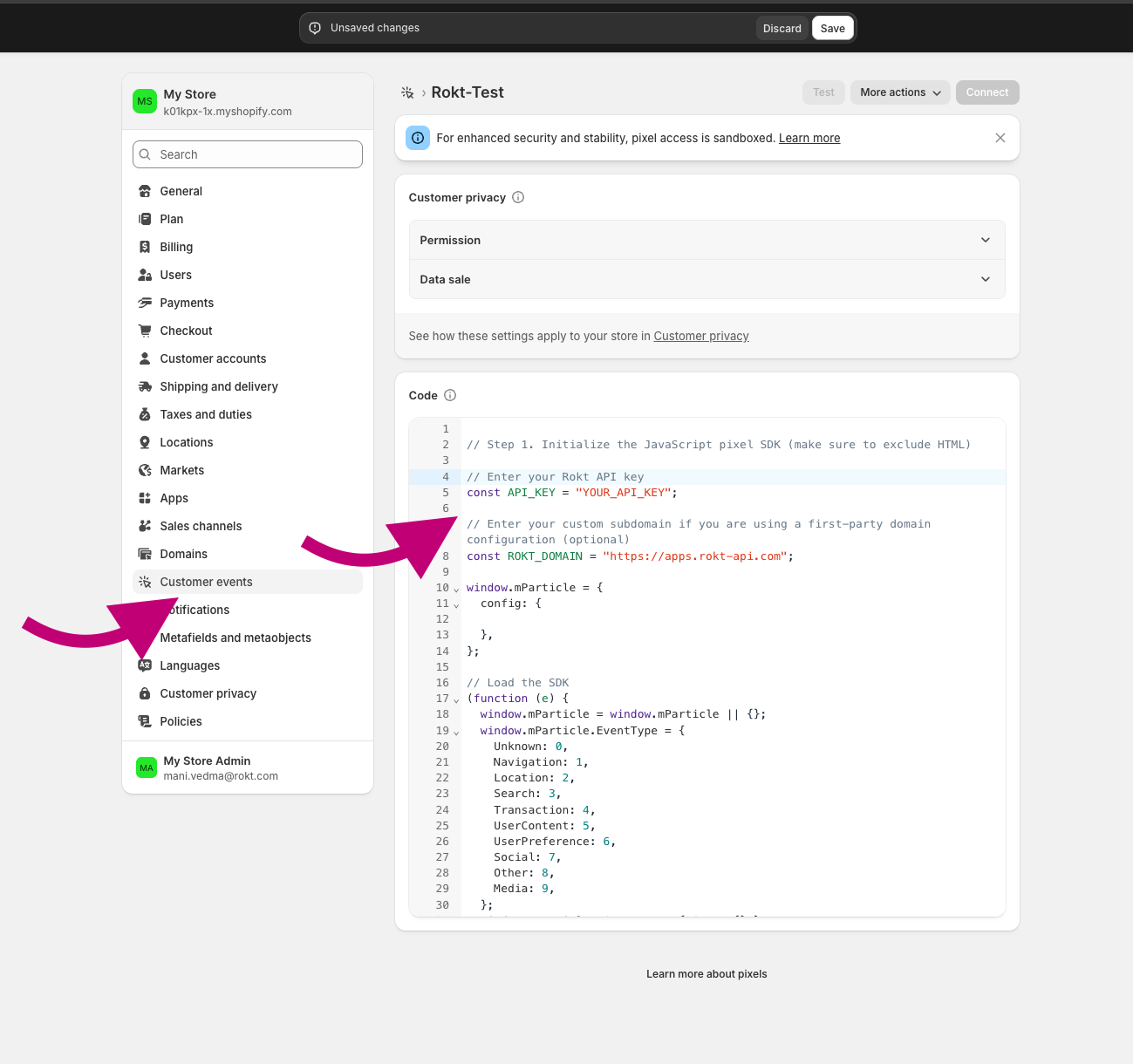
- Where you see
// Step 1. Initialize the JavaScript pixel SDK (make sure to exclude HTML), paste the Rokt SDK initialization script below.
Initialization scriptLien direct vers Initialization script
Paste the following script where the pixel editor indicates (e.g. Step 1. Initialize the JavaScript pixel SDK). Replace YOUR_API_KEY with the key provided by your Rokt account manager.
// Enter your Rokt API key
const API_KEY = "YOUR_API_KEY";

// Enter your custom subdomain if you are using a first-party domain configuration (optional)
const ROKT_DOMAIN = "https://apps.rokt-api.com";

window.mParticle = {
  config: {

  },
};

// Load the SDK
(function (e) {
  window.mParticle = window.mParticle || {};
  window.mParticle.EventType = {
    Unknown: 0,
    Navigation: 1,
    Location: 2,
    Search: 3,
    Transaction: 4,
    UserContent: 5,
    UserPreference: 6,
    Social: 7,
    Other: 8,
    Media: 9,
  };
  window.mParticle.eCommerce = { Cart: {} };
  window.mParticle.Identity = {};
  window.mParticle.Rokt = {};
  window.mParticle.config = window.mParticle.config || {};
  window.mParticle.config.rq = [];
  window.mParticle.config.snippetVersion = 2.7;
  window.mParticle.ready = function (e) {
    window.mParticle.config.rq.push(e);
  };
  [
    "endSession",
    "logError",
    "logBaseEvent",
    "logEvent",
    "logForm",
    "logLink",
    "logPageView",
    "setSessionAttribute",
    "setAppName",
    "setAppVersion",
    "setOptOut",
    "setPosition",
    "startNewSession",
    "startTrackingLocation",
    "stopTrackingLocation",
  ].forEach(function (e) {
    window.mParticle[e] = function () {
      var t = Array.prototype.slice.call(arguments);
      t.unshift(e);
      window.mParticle.config.rq.push(t);
    };
  });
  ["setCurrencyCode", "logCheckout"].forEach(function (e) {
    window.mParticle.eCommerce[e] = function () {
      var t = Array.prototype.slice.call(arguments);
      t.unshift("eCommerce." + e);
      window.mParticle.config.rq.push(t);
    };
  });
  ["identify", "login", "logout", "modify"].forEach(function (e) {
    window.mParticle.Identity[e] = function () {
      var t = Array.prototype.slice.call(arguments);
      t.unshift("Identity." + e);
      window.mParticle.config.rq.push(t);
    };
  });
  ["selectPlacements", "hashAttributes", "setExtensionData", "use", "getVersion", "terminate"].forEach(
    function (e) {
      window.mParticle.Rokt[e] = function () {
        var t = Array.prototype.slice.call(arguments);
        t.unshift("Rokt." + e);
        window.mParticle.config.rq.push(t);
      };
    }
  );
  var t = window.mParticle.config.isDevelopmentMode ? 1 : 0,
    n = "?env=" + t,
    a = window.mParticle.config.dataPlan;
  if (a) {
    var o = a.planId,
      r = a.planVersion;
    o && (r && (r < 1 || r > 1e3) && (r = null), (n += "&plan_id=" + o + (r ? "&plan_version=" + r : "")));
  }
  var i = window.mParticle.config.versions,
    s = [];
  i &&
    Object.keys(i).forEach(function (e) {
      s.push(e + "=" + i[e]);
    });
  var c = document.createElement("script");
  c.type = "text/javascript";
  c.async = !0;
  window.ROKT_DOMAIN = ROKT_DOMAIN || "https://apps.rokt-api.com";
  mParticle.config.domain = ROKT_DOMAIN.split("//")[1];
  c.src = ROKT_DOMAIN + "/js/v2/" + e + "/app.js" + n + "&" + s.join("&");
  var l = document.getElementsByTagName("script")[0];
  l.parentNode.insertBefore(c, l);
})(API_KEY);
Step 2: Add event subscribersLien direct vers Step 2: Add event subscribers
Add the following subscribers in your Custom Pixel. Each corresponds to a Shopify customer event and sends the relevant data to Rokt.
Page viewsLien direct vers Page views
analytics.subscribe("page_viewed", async (event) => {
  window.mParticle.logPageView("Page View", {
    page: event.context.document.location.href,
    title: event.context.document.title,
    referrer: event.context.document.referrer,
  });
});
Product viewedLien direct vers Product viewed
analytics.subscribe("product_viewed", (event) => {
  window.mParticle.ready(function () {
    var product = window.mParticle.eCommerce.createProduct(
      // Name
      event.data.productVariant.title,
      // SKU
      event.data.productVariant.sku,
      // Price
      event.data.productVariant.price.amount,
      // Quantity
      1,
      // Variant
      undefined,
      // Category
      event.data.productVariant.product.type,
      // Brand
      event.data.productVariant.product.vendor
    );
    window.mParticle.eCommerce.logProductAction(
      window.mParticle.ProductActionType.ViewDetail,
      product
    );
  });
});
Add to cartLien direct vers Add to cart
analytics.subscribe("product_added_to_cart", (event) => {
  window.mParticle.ready(function () {
    var product = window.mParticle.eCommerce.createProduct(
      // Name
      event.data.cartLine.merchandise.product.title,
      // SKU
      event.data.cartLine.merchandise.sku,
      // Price
      event.data.cartLine.merchandise.price.amount,
      // Quantity
      event.data.cartLine.quantity,
      // Variant
      event.data.cartLine.merchandise.title,
      // Category
      event.data.cartLine.merchandise.type,
      // Brand
      event.data.cartLine.merchandise.vendor
    );
    window.mParticle.eCommerce.logProductAction(
      window.mParticle.ProductActionType.AddToCart,
      product
    );
  });
});
Checkout startedLien direct vers Checkout started
analytics.subscribe("checkout_started", (event) => {
  window.mParticle.ready(function () {
    var products = [];

    event.data.checkout.lineItems.forEach(function (item) {
      var mpProduct = window.mParticle.eCommerce.createProduct(
        // Name
        item.title,
        // SKU
        item.variant.sku,
        // Price
        item.finalLinePrice.amount,
        // Quantity
        item.quantity,
        // Variant
        item.variant.title,
        // Category
        item.variant.product.type,
        // Brand
        item.variant.product.vendor
      );
      products.push(mpProduct);
    });

    window.mParticle.eCommerce.logProductAction(
      window.mParticle.ProductActionType.Checkout,
      products,
      { step: 2 }
    );
  });
});
Checkout contact info submittedLien direct vers Checkout contact info submitted
analytics.subscribe("checkout_contact_info_submitted", (event) => {
  window.mParticle.ready(function () {
    const rawemail = event.data.checkout.email;
    const identifyRequest = {
      userIdentities: {
        // If your privacy policy requires hashing, please change the key below from email to other
        email: rawemail,
        // other: hashedemail
      },
    };
    const identityCallback = function (result) {
      if (result.getUser()) {
        // Add/Remove the following user attributes per your privacy policy
        const checkout = event.data.checkout;
        const billingAddress = checkout.billingAddress;
        if (billingAddress) {
          result.getUser().setUserAttribute("$firstname", billingAddress.firstName);
          result.getUser().setUserAttribute("$lastname", billingAddress.lastName);
          result.getUser().setUserAttribute("$Mobile", billingAddress.phone);
          result.getUser().setUserAttribute("$zip", billingAddress.zip);
        }
      }
    };
    window.mParticle.Identity.identify(identifyRequest, identityCallback);
    window.mParticle.logEvent(
      "checkout_contact_info_submitted",
      window.mParticle.EventType.Transaction,
      {}
    );
  });
});
Checkout completedLien direct vers Checkout completed
analytics.subscribe("checkout_completed", (event) => {
  window.mParticle.ready(function () {
    const email = event.data.checkout.email;
    const identifyRequest = {
      userIdentities: {
        email: email,
      },
    };
    const identityCallback = function (result) {
      if (result.getUser()) {
        const billingAddress = event.data.checkout.billingAddress;
        if (billingAddress) {
          result.getUser().setUserAttribute("$firstname", billingAddress.firstName);
          result.getUser().setUserAttribute("$lastname", billingAddress.lastName);
          result.getUser().setUserAttribute("$Mobile", billingAddress.phone);
          result.getUser().setUserAttribute("$zip", billingAddress.zip);
        }

        var products = [];
        event.data.checkout.lineItems.forEach(function (item) {
          var mpProduct = window.mParticle.eCommerce.createProduct(
            item.title,
            item.variant.product.id,
            item.finalLinePrice.amount,
            item.quantity,
            item.variant.title,
            item.variant.product.type,
            item.variant.product.vendor
          );
          products.push(mpProduct);
        });

        var checkoutTotalPrice = event.data.checkout.totalPrice.amount;
        window.mParticle.eCommerce.logProductAction(
          window.mParticle.ProductActionType.Purchase,
          products,
          { step: 3, revenue: checkoutTotalPrice }
        );
      }
    };
    window.mParticle.Identity.identify(identifyRequest, identityCallback);
  });
});