Impact Radius
To set up your integration with Rokt, you will need to configure a postback using the instructions below:
-
Log in to your Impact Radius account.
-
Invite Rokt to the affiliate program on the Impact platform.
- Rokt account name: Rokt_US
- Rokt account ID: 2666683
-
After sending the invitation, please inform your Rokt account manager.
-
Once Rokt has accepted the invitation, you can proceed to set up the integration.
-
Create your ad link. Please ensure your link includes the following parameters…
- subID1: {rokt.carbon.conversiontrackingid|}
- subID2: {ACCOUNT_ID}
- subID3: Conversion event / Action Tracker (e.g. install, purchase)
-
Set up postbacks.
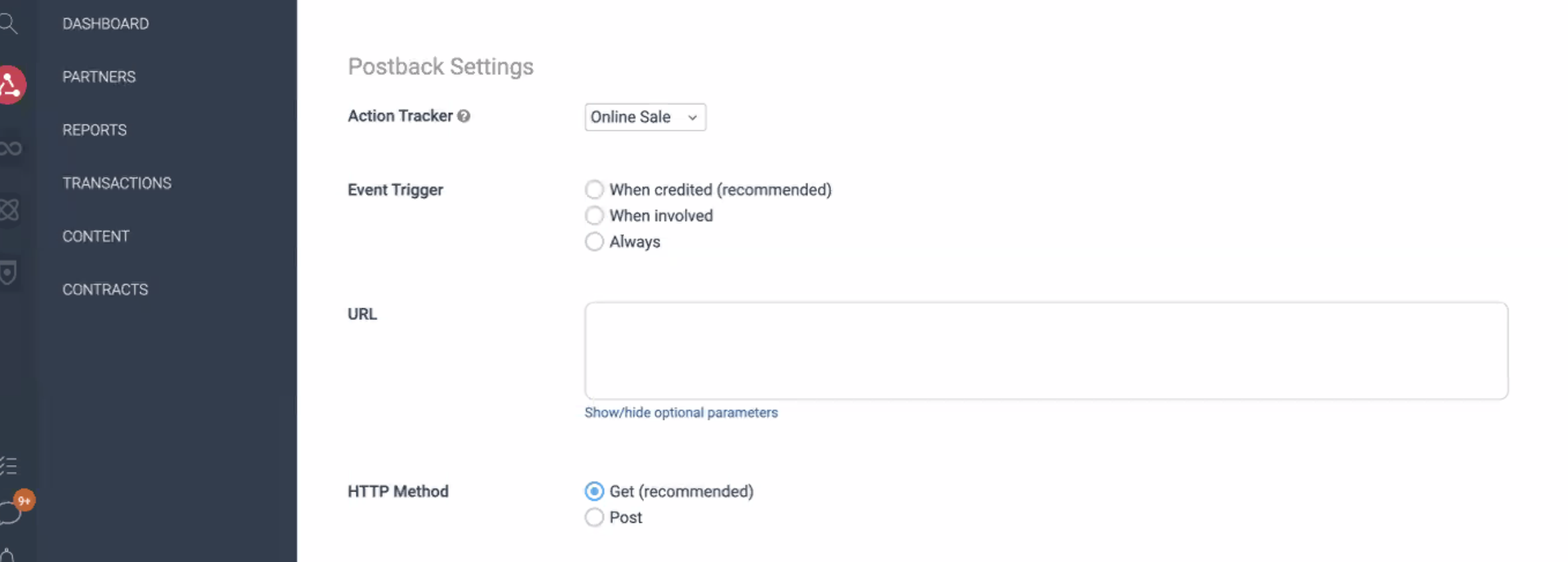
- Select the action tracker which represents the conversion event your Rokt campaign will be optimized towards (e.g purchase, form fill, install)
- This should be consistent with your campaign's KPI(s). Align with your client success team on the conversion events important for the success of your campaign.
- Update your event trigger to "always"
- This allows Rokt to gain insight into all conversions driven from the Rokt network. The more conversions Rokt's platform sees, the better it can optimize targeting and improve campaign efficiency. This does not change how Impact measures and attributes Rokt's campaign performance.
- URL:
https://apps.rokt.com/api/conv? - HTTP Method: POST
- Body:
id={SubId2}&passbackconversiontrackingid={SubId1}&conversiontype={SubId3} - Body format: Query String
- Show advanced settings: Leave as default
- Click Save
- After configuring your postback link, you can test your setup at the event level by using the
Testfeature. Expand the dropdown underActionsto find this option
-
After you have set up your ad link and postback, please share the ad link with your Rokt account manager.