Merging products for Nordstrom
This guide explains when and how to merge products for Nordstrom listings. Nordstrom requires that all variants of one product — every color and size — are contained within a single listing. If your catalog has separate listings for different colors or sizes of the same style, you need to merge them before submitting for QA.
When to merge productsDirect link to When to merge products
All colors and sizes of the same style must exist as a single product with multiple variants. Products that are identical except for color or size must not exist as separate listings.
Merge whenDirect link to Merge when
- The same style exists as separate listings with different colors.
- The same style exists as separate listings with different sizes.
- Any combination of color and size variants are split across multiple listings.
Do not merge whenDirect link to Do not merge when
- Material composition differs between products.
- Fabrication differs between products.
- Jewelry differs by carat weight, gemstone, or metal type.
- Products span different genders or age groups (e.g., a Men's Sweater X and Women's Sweater X should remain separate).
Identify products that need mergingDirect link to Identify products that need merging
Here are a few strategies to find products in your catalog that likely need to be combined:
- Sort by product title and look for repeated style names with different colors or sizes.
- Search by style name when titles are structured size-first or are inconsistently formatted.
- Visual comparison: If products look visually identical but exist as separate listings, they likely require merging.
How to merge productsDirect link to How to merge products
To merge products, go to the home page of the QA tool, you should see multiple products listed. Once there, select 2 or more products that you would like to merge, click 'More actions', then click 'Merge products'. You can then choose the merged project name, and merge the products.
Once the product is merged, we recommend QA-ing the merged product, and ensure that all product-level information is correct, and not only referencing one of the merged products.
NRF Color Code referenceDirect link to NRF Color Code reference
When assigning color attributes during QA, each Color Description must map to a single NRF Color Code. Below is the full reference table. Our ProductAI generally fills this field accurately, but verify it during your review.
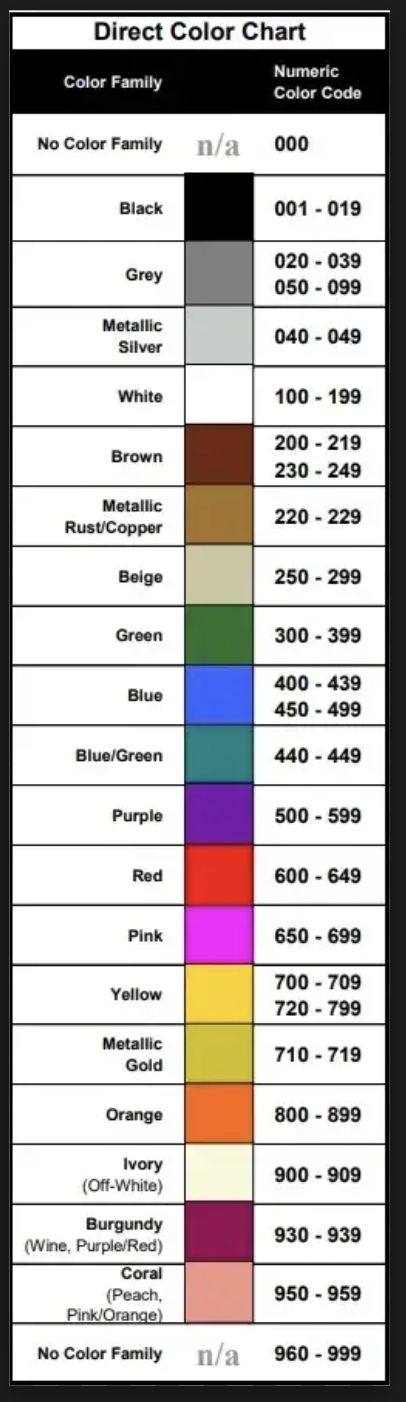
For more on how color attributes work during QA, see Reviewing product attributes for Nordstrom.
Related articlesDirect link to Related articles
You might also find these helpful: